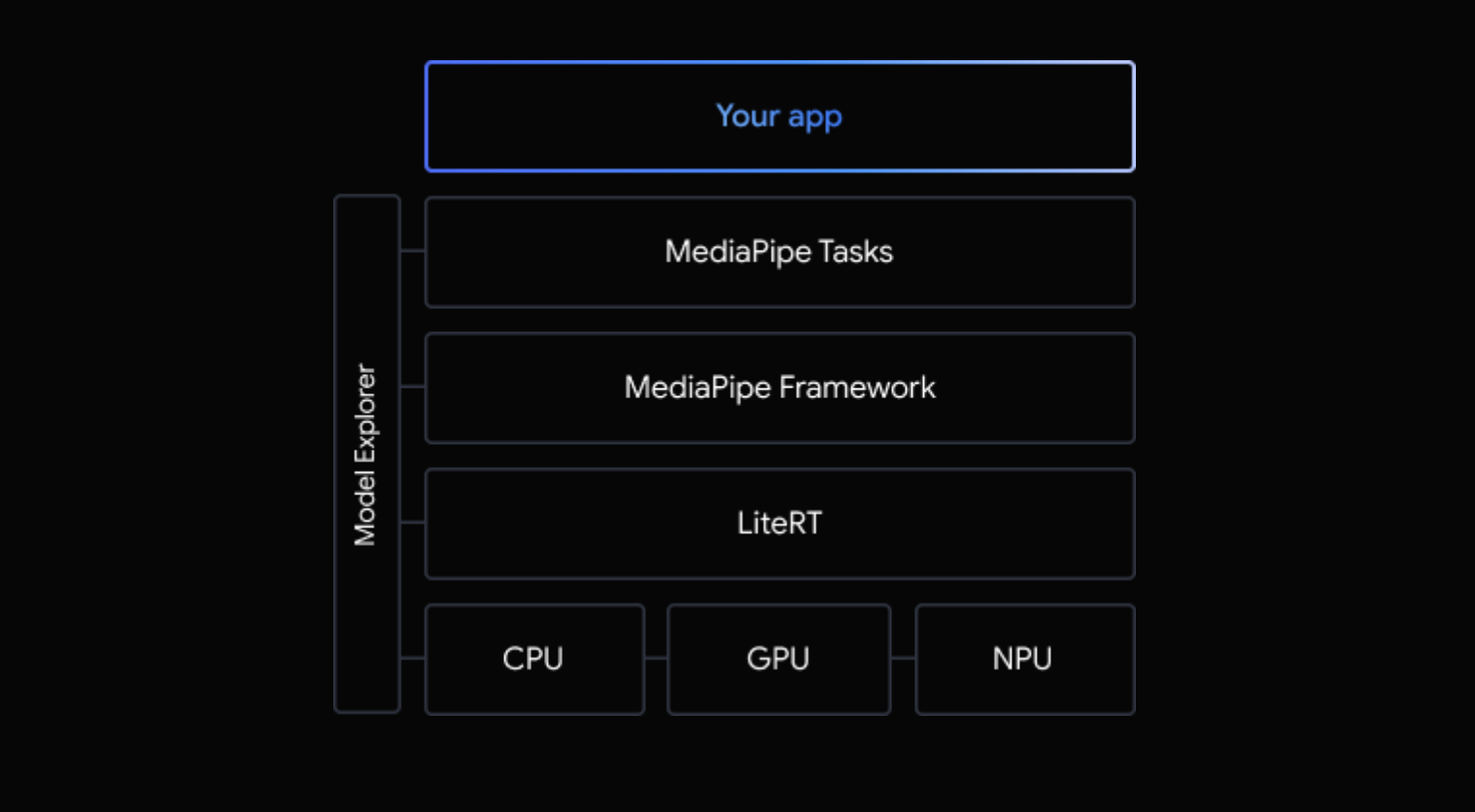
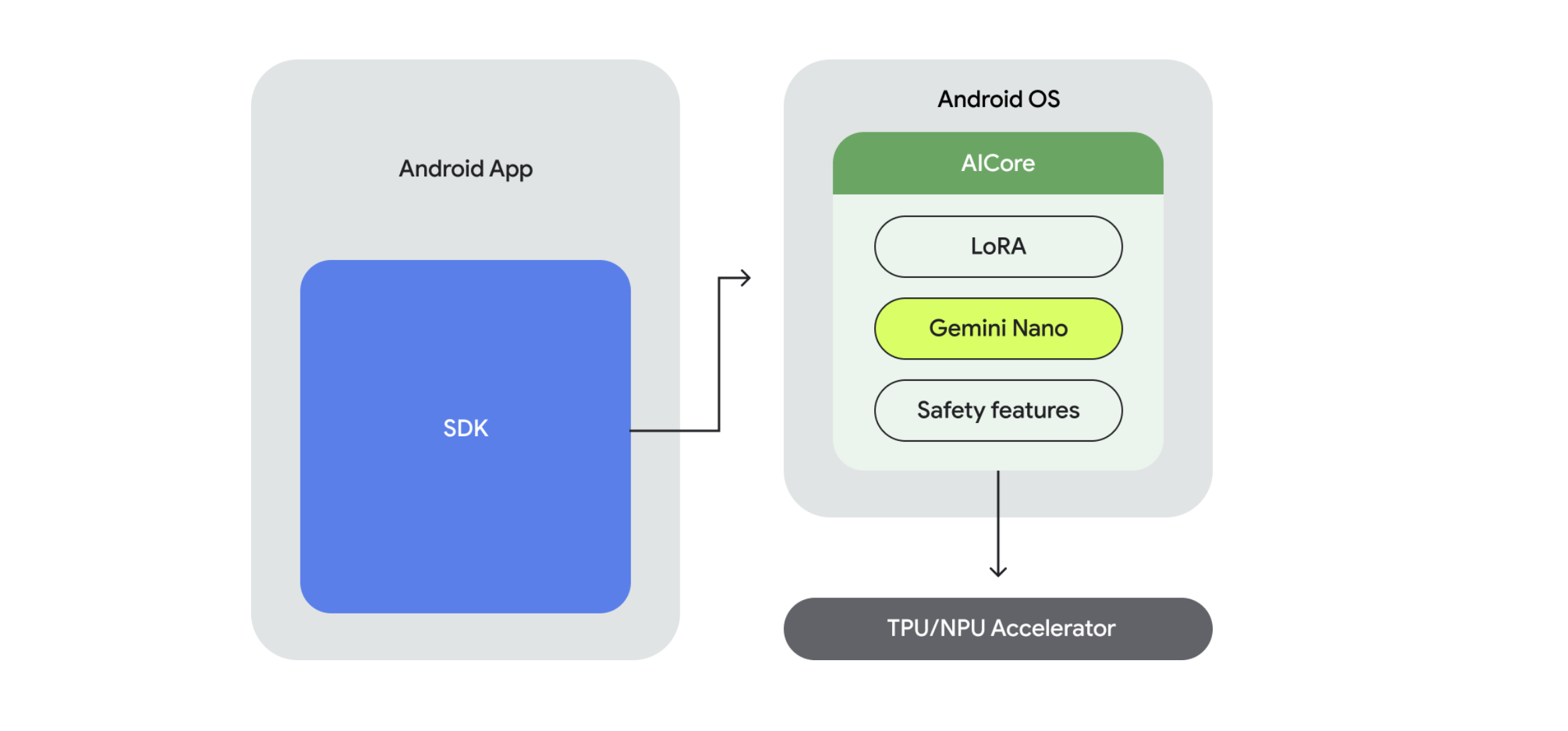
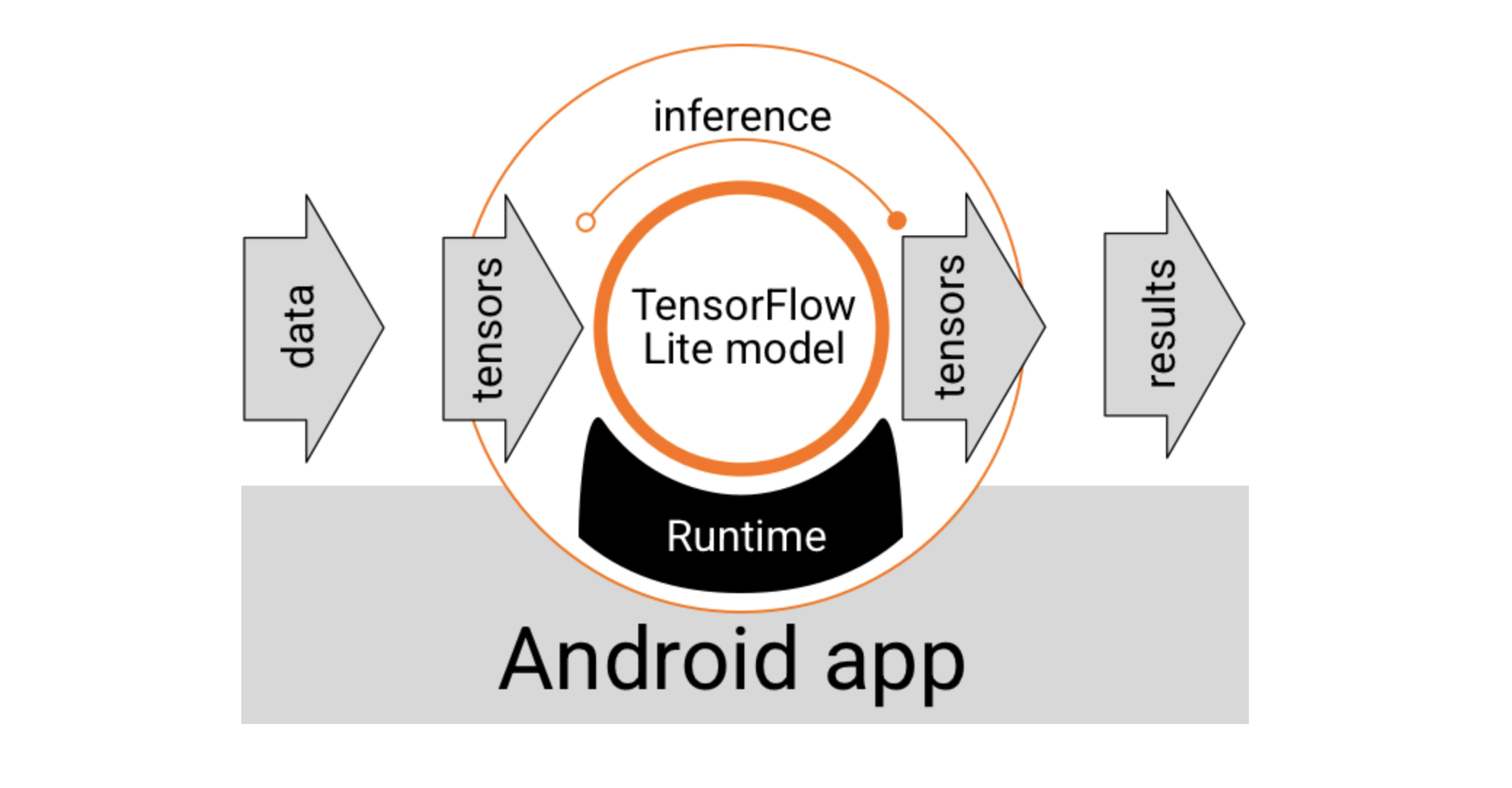
使用 Java API 访问 Google Play 服务中的 LiteRT。具体而言,Google Play 服务中的 LiteRT 可通过 LiteRT 解释器 API 来使用。
使用 Interpreter API
TensorFlow 运行时提供的 LiteRT 解释器 API 提供了一个用于构建和运行机器学习模型的通用接口。按照以下步骤操作,即可使用 Google Play 服务中的 TensorFlow Lite 运行时通过 Interpreter API 运行推理。
1. 添加项目依赖项
注意: Google Play 服务中的 LiteRT 使用 play-services-tflite 软件包。 将以下依赖项添加到您的应用项目代码中,以访问 LiteRT 的 Play 服务 API:
dependencies{...// LiteRT dependencies for Google Play servicesimplementation'com.google.android.gms:play-services-tflite-java:16.1.0'// Optional: include LiteRT Support Libraryimplementation'com.google.android.gms:play-services-tflite-support:16.1.0'...}
2. 添加了 LiteRT 的初始化
在之前使用 LiteRT API 时,初始化 Google Play 服务 API 的 LiteRT 组件:
通常,您应使用 Google Play 服务提供的运行时环境,因为它比标准环境更节省空间,因为它会动态加载,从而缩减应用大小。Google Play 服务还会自动使用最新的稳定版 LiteRT 运行时,随着时间的推移,为您提供更多功能并提升性能。如果您 在未包含 Google Play 服务的设备上提供应用,或者需要密切管理 ML 运行时环境,则应使用标准 LiteRT 运行时 。此选项会将额外的代码捆绑到您的应用中,让您可以更好地控制应用中的机器学习运行时,但代价是增加应用的下载大小。
CPU + GPU 混合推理:对于一些较大的模型,即使单张 GPU 的显存不足以容纳整个模型,llama.cpp 也能将模型的某些层加载到 GPU 上运行,其余部分则在 CPU 上运行,实现资源的有效利用。
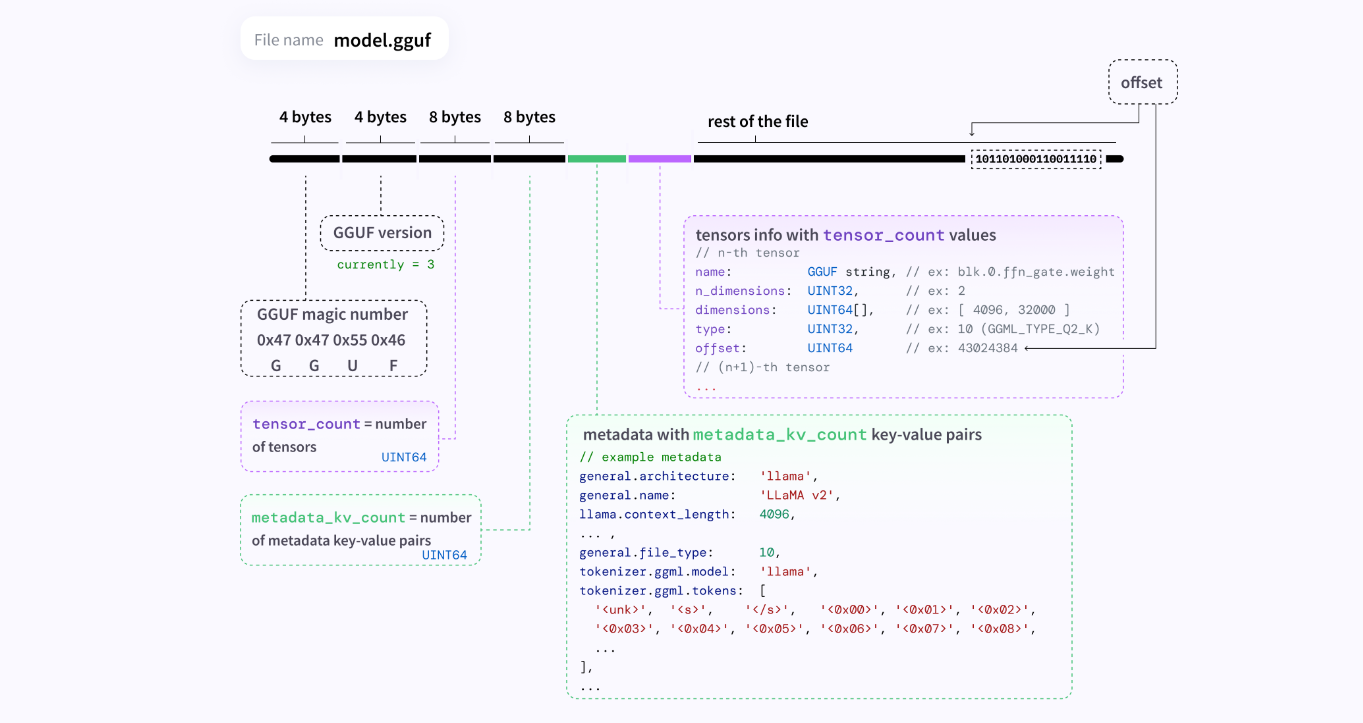
GGUF 文件格式
GGML
GGML 是一种为机器学习设计的文件格式和张量库,它最初由开发者 Georgi Gerganov 创建(GGML = Gerganov’s General Machine Learning)。它的核心目标是高效地在 CPU 上运行大型机器学习模型,特别是大型语言模型(LLMs),并且支持各种硬件平台。
GGML 的核心是用 C 语言编写的,这意味着它的 执行效率非常高 ,并且依赖性极少。这使得它非常轻量级,可以在各种不同的操作系统和硬件上轻松编译和运行,包括 macOS、Linux、Windows,甚至 iOS 和 Android。
GGML 最初的重点在于在 CPU 上实现高效推理。它利用了现代 CPU 的特性,例如 SIMD(单指令多数据)指令集 ,比如 Intel 的 AVX、AVX2、AVX512 和 ARM 的 NEON,这些指令允许 CPU 同时处理多个数据点,从而加速矩阵乘法等并行计算。可以利用 CPU 的多个核心并行执行计算任务。
CPU 也能执行并行计算 ,现代 CPU 通常有多个核心,并且支持 SIMD (Single Instruction, Multiple Data) 指令集(如 Intel 的 AVX、SSE 指令集),这使得它们能够同时处理少量数据。例如机器学习框架(如 TensorFlow 或 PyTorch),在设备没有GPU时,会自动回退到使用 CPU 来执行所有的矩阵乘法和其他计算。这些框架的 CPU 版本也会进行高度优化,以尽可能利用 CPU 的并行能力。
传统的 CPU 指令(称为 标量指令 或 SISD - Single Instruction, Single Data)一次只能对一个数据对(例如,两个整数或浮点数)进行操作。相比之下,SIMD 指令将多个数据项打包到一个特殊的 宽寄存器 中,然后一次性对所有这些数据项执行相同的操作。向量寄存器是 SIMD 的关键。它们比普通的通用寄存器宽得多。常见的宽度有 128位、256位,以及最新的 512位。假设有一个 256 位的寄存器和 32 位的整数。您可以将 256/32=8 个整数打包到这个寄存器中。当 CPU 执行一个 SIMD 加法指令时,它会在一个时钟周期内同时对这 8 个整数执行加法操作。这就像将一条生产线变成了八条。
classDeepseekChatRepository(privatevalktorClient:KtorClient){companionobject{constvalBASE_URL="https://api.deepseek.com"constvalLOCAL_SERVER="http://0.0.0.0:8080/v1"constvalCOMMON_SYSTEM_PROMT="你是一个人工智能系统,可以根据用户的输入来返回生成式的回复"constvalENGLISH_SYSTEM_PROMT="You are a English teacher, you can help me improve my English skills, please answer my questions in English."constvalAPI_KEY="xxxxxxxxxxxxxxxxx"constvalMODEL_NAME="deepseek-chat"}suspendfunlocalLLMChat(chat:String)=withContext(Dispatchers.IO){ktorClient.client.post("${LOCAL_SERVER}/chat/completions"){// 配置请求头headers{append("Content-Type","application/json")}setBody(DeepSeekRequestBean(model="DeepSeek-R1-Distill-Qwen-1.5B-Q2_K",max_tokens=256,temperature=0.7f,stream=false,messages=listOf(RequestMessage(COMMON_SYSTEM_PROMT,ChatRole.SYSTEM.roleDescription),RequestMessage(chat,ChatRole.USER.roleDescription))))}.body<LocalModelResult>()}}
界面上维护一个chatListState,里面是一个
data classAiChatUiState(valchatList:List<ChatItem>=listOf(),vallistSize:Int=chatList.size){funtoUiState()=AiChatUiState(chatList=chatList,listSize=listSize)}data classChatItem(valcontent:String,valrole:ChatRole,)
classGGUFReader{companionobject{init{System.loadLibrary("ggufreader")}}privatevarnativeHandle:Long=0Lsuspendfunload(modelPath:String)=withContext(Dispatchers.IO){nativeHandle=getGGUFContextNativeHandle(modelPath)}fungetContextSize():Long?{assert(nativeHandle!=0L){"Use GGUFReader.load() to initialize the reader"}valcontextSize=getContextSize(nativeHandle)returnif(contextSize==-1L){null}else{contextSize}}fungetChatTemplate():String?{assert(nativeHandle!=0L){"Use GGUFReader.load() to initialize the reader"}valchatTemplate=getChatTemplate(nativeHandle)returnchatTemplate.ifEmpty{null}}privateexternalfungetGGUFContextNativeHandle(modelPath:String):LongprivateexternalfungetContextSize(nativeHandle:Long):LongprivateexternalfungetChatTemplate(nativeHandle:Long):String}
std::stringprompt(_formattedMessages.begin()+_prevLen,_formattedMessages.begin()+newLen);_promptTokens=common_tokenize(llama_model_get_vocab(_model),prompt,true,true);// create a llama_batch containing a single sequence// see llama_batch_init for more details_batch=newllama_batch();_batch->token=_promptTokens.data();_batch->n_tokens=_promptTokens.size();
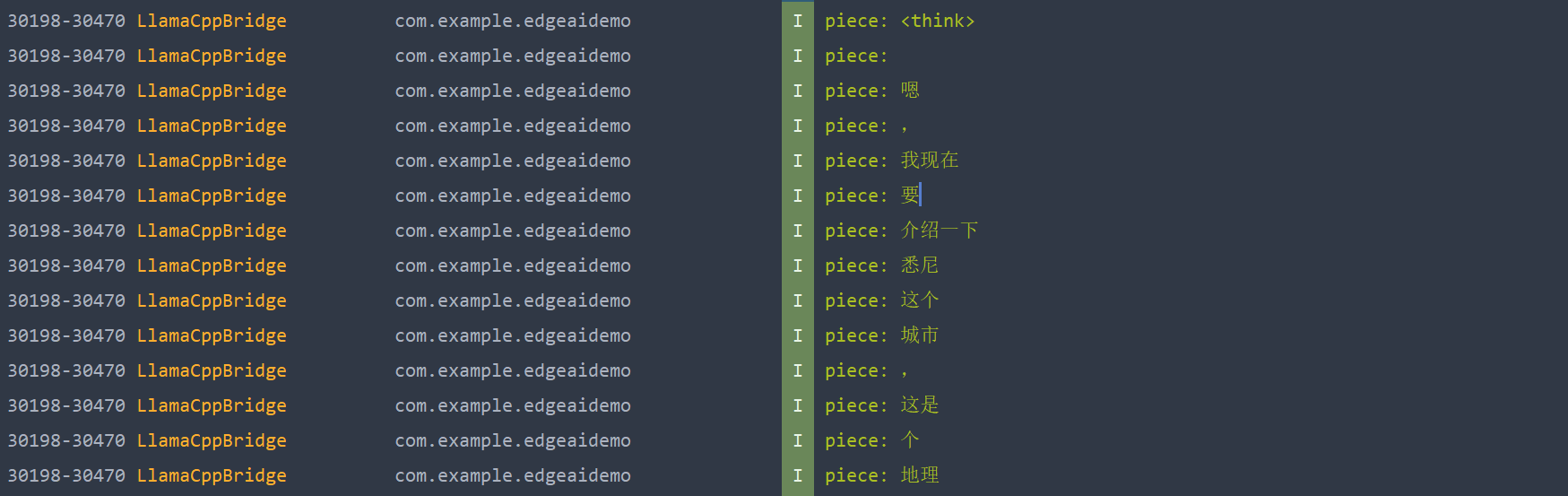
对于Java层,可以通过token数量,或者检测返回的token中是否有 “EOG” 字符串。即 End Of Generation 。当模型采样到一个被词汇表 (llama_vocab) 识别为 EOG 的 Token ID 时,意味着模型认为它已经完成了对用户 Prompt 的回答。
// sample a token and check if it is an EOG (end of generation token)_currToken=llama_sampler_sample(_sampler,_ctx,-1);if(llama_vocab_is_eog(llama_model_get_vocab(_model),_currToken)){// ... 返回 "[EOG]" 停止生成 ...}
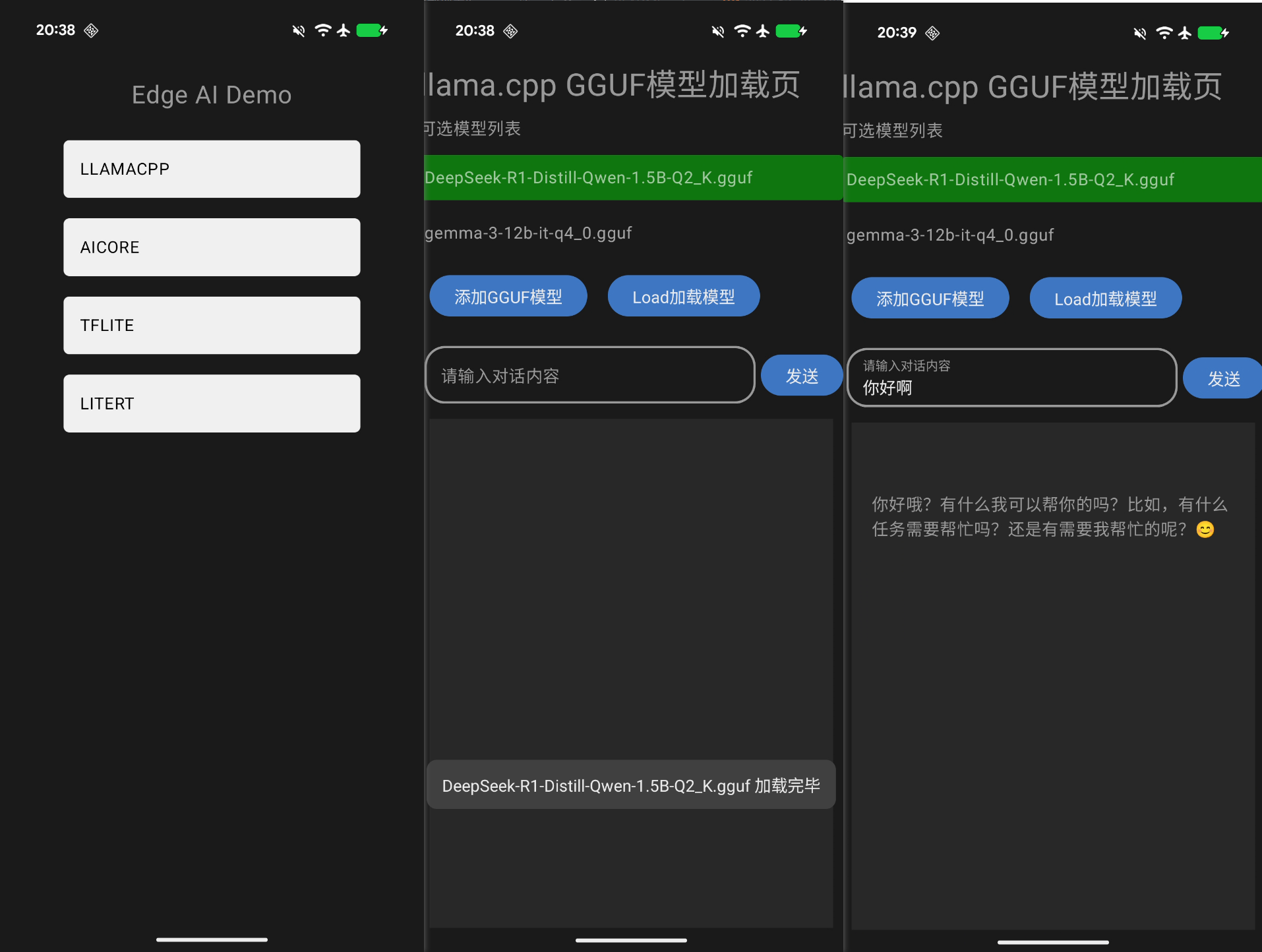
运行效果
将这个模组直接封装成一个aar,也可以直接被其他模组依赖编译。
外部使用时,先将 .gguf 文件从手机下载路径复制到内部目录,也可以直接在线从 Hugging Face 上下载到本地内部目录。然后调用 loadModel() 、 getResponseAsFlow() 等接口来加载模型,获取生成的对话回复。
Posted on: November 11, 2023 | at 04:00 PM (34 min read) llm ai llama llm-internals
In this post, we will dive into the internals of Large Language Models (LLMs) to gain a practical understanding of how they work. To aid us in this exploration, we will be using the source code of llama.cpp, a pure c++ implementation of Meta’s LLaMA model. Personally, I have found llama.cpp to be an excellent learning aid for understanding LLMs on a deeper level. Its code is clean, concise and straightforward, without involving excessive abstractions. We will use this commit version.
We will focus on the inference aspect of LLMs, meaning: how the already-trained model generates responses based on user prompts.
This post is written for engineers in fields other than ML and AI who are interested in better understanding LLMs. It focuses on the internals of an LLM from an engineering perspective, rather than an AI perspective. Therefore, it does not assume extensive knowledge in math or deep learning.
Throughout this post, we will go over the inference process from beginning to end, covering the following subjects (click to jump to the relevant section):
Tensors: A basic overview of how the mathematical operations are carried out using tensors, potentially offloaded to a GPU.
Tokenization: The process of splitting the user’s prompt into a list of tokens, which the LLM uses as its input.
Embedding: The process of converting the tokens into a vector representation.
The Transformer: The central part of the LLM architecture, responsible for the actual inference process. We will focus on the self-attention mechanism.
Sampling: The process of choosing the next predicted token. We will explore two sampling techniques.
The KV cache: A common optimization technique used to speed up inference in large prompts. We will explore a basic kv cache implementation.
By the end of this post you will hopefully gain an end-to-end understanding of how LLMs work. This will enable you to explore more advanced topics, some of which are detailed in the last section.
High-level flow from prompt to output
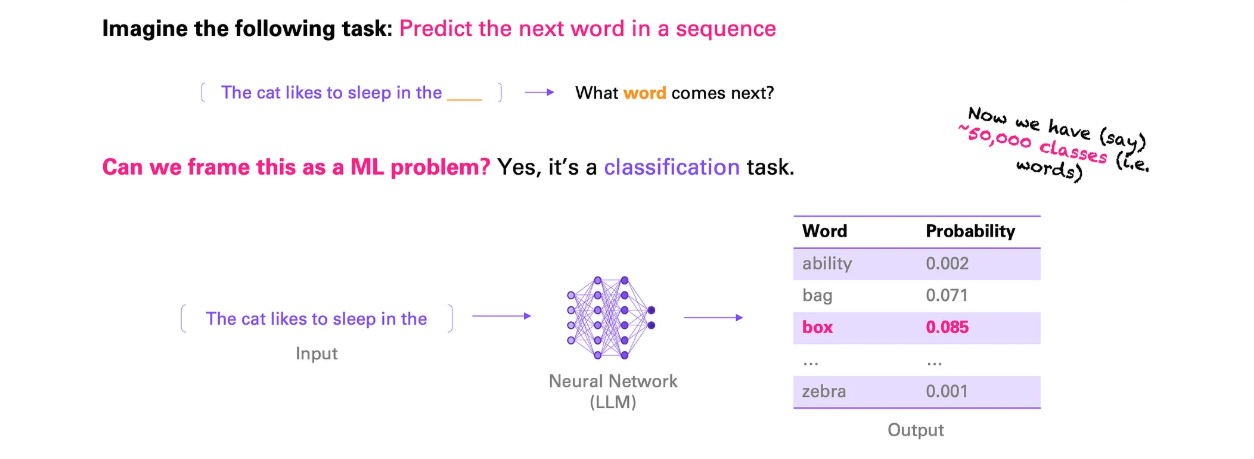
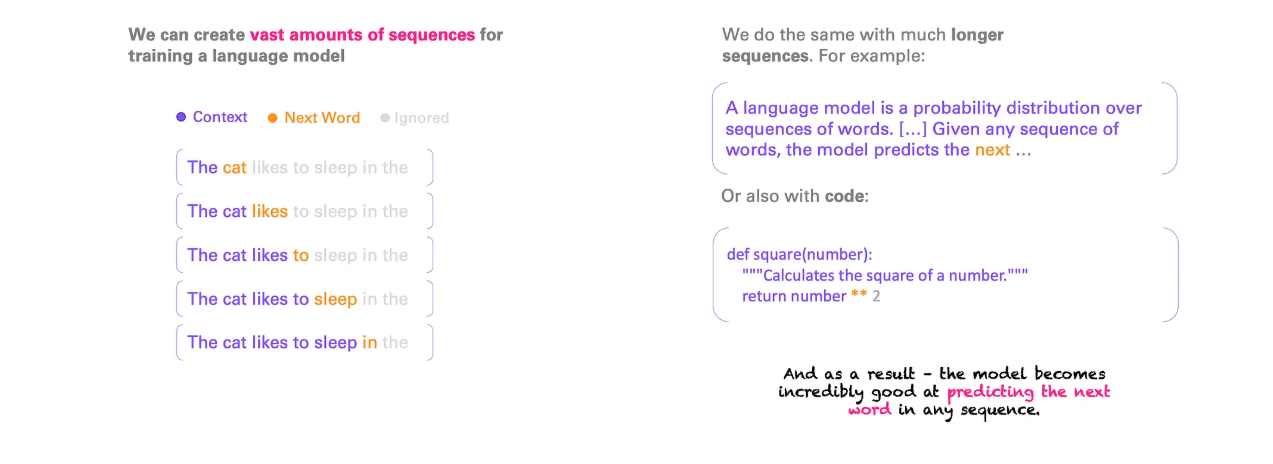
As a large language model, LLaMA works by taking an input text, the “prompt”, and predicting what the next tokens, or words, should be.
To illustrate this, we will use the first sentence from the Wikipedia article about Quantum Mechanics as an example. Our prompt is:
Quantum mechanics is a fundamental theory in physics that
The LLM attempts to continue the sentence according to what it was trained to believe is the most likely continuation. Using llama.cpp, we get the following continuation:
provides insights into how matter and energy behave at the atomic scale.
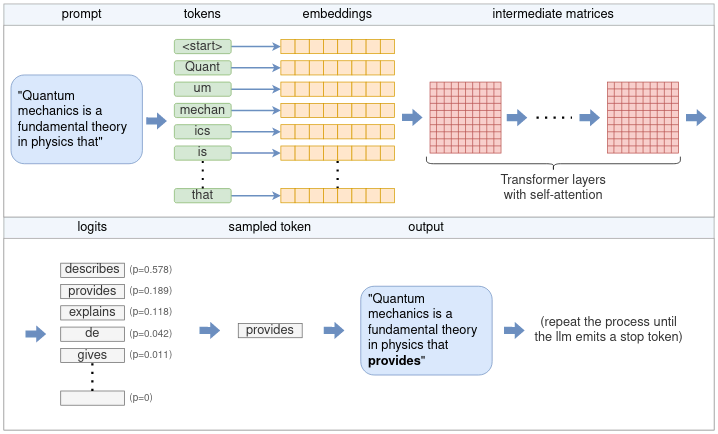
Let’s begin by examining the high-level flow of how this process works. At its core, an LLM only predicts a single token each time. The generation of a complete sentence (or more) is achieved by repeatedly applying the LLM model to the same prompt, with the previous output tokens appended to the prompt. This type of model is referred to as an autoregressive model. Thus, our focus will primarily be on the generation of a single token, as depicted in the high-level diagram below:
The full flow for generating a single token from a user prompt includes various stages such as tokenization, embedding, the Transformer neural network and sampling. These will be covered in this post.
Following the diagram, the flow is as follows:
The tokenizer splits the prompt into a list of tokens. Some words may be split into multiple tokens, based on the model’s vocabulary. Each token is represented by a unique number.
Each numerical token is converted into an embedding. An embedding is a vector of fixed size that represents the token in a way that is more efficient for the LLM to process. All the embeddings together form an embedding matrix.
The embedding matrix serves as the input to the Transformer. The Transformer is a neural network that acts as the core of the LLM. The Transformer consists of a chain of multiple layers. Each layer takes an input matrix and performs various mathematical operations on it using the model parameters, the most notable being the self-attention mechanism. The layer’s output is used as the next layer’s input.
A final neural network converts the output of the Transformer into logits. Each possible next token has a corresponding logit, which represents the probability that the token is the “correct” continuation of the sentence.
One of several sampling techniques is used to choose the next token from the list of logits.
The chosen token is returned as the output. To continue generating tokens, the chosen token is appended to the list of tokens from step (1), and the process is repeated. This can be continued until the desired number of tokens is generated, or the LLM emits a special end-of-stream (EOS) token.
In the following sections, we will delve into each of these steps in detail. But before doing that, we need to familiarize ourselves with tensors.
Understanding tensors with ggml
Tensors are the main data structure used for performing mathemetical operations in neural networks. llama.cpp uses ggml, a pure C++ implementation of tensors, equivalent to PyTorch or Tensorflow in the Python ecosystem. We will use ggml to get an understanding of how tensors operate.
A tensor represents a multi-dimensional array of numbers. A tensor may hold a single number, a vector (one-dimensional array), a matrix (two-dimensional array) or even three or four dimensional arrays. More than is not needed in practice.
It is important to distinguish between two types of tensors. There are tensors that hold actual data, containing a multi-dimensional array of numbers. On the other hand, there are tensors that only represent the result of a computation between one or more other tensors, and do not hold data until actually computed. We will explore this distinction soon.
Basic structure of a tensor
In ggml tensors are represented by the ggml_tensor struct. Simplified slightly for our purposes, it looks like the following:
// ggml.hstructggml_tensor{enumggml_typetype;enumggml_backendbackend;intn_dims;// number of elementsint64_tne[GGML_MAX_DIMS];// stride in bytessize_tnb[GGML_MAX_DIMS];enumggml_opop;structggml_tensor*src[GGML_MAX_SRC];void*data;charname[GGML_MAX_NAME];};
The first few fields are straightforward:
type contains the primitive type of the tensor’s elements. For example, GGML_TYPE_F32 means that each element is a 32-bit floating point number.
enum contains whether the tensor is CPU-backed or GPU-backed. We’ll come back to this bit later.
n_dims is the number of dimensions, which may range from 1 to 4.
ne contains the number of elements in each dimension. ggml is row-major order, meaning that ne[0] marks the size of each row, ne[1] of each column and so on.
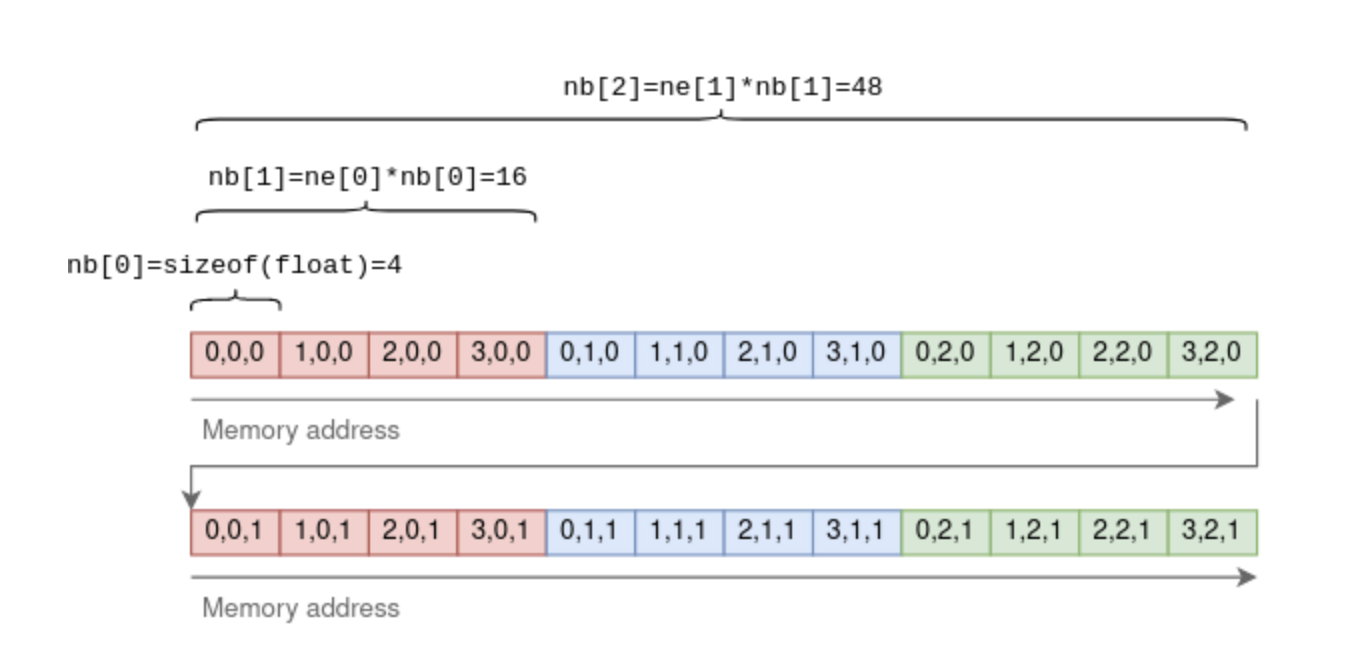
nb is a bit more sophisticated. It contains the stride: the number of bytes between consequetive elements in each dimension. In the first dimension this will be the size of the primitive element. In the second dimension it will be the row size times the size of an element, and so on. For example, for a 4x3x2 tensor:
An example tensor of 32-bit floating points with dimensions {4,3,2} and strides {4,16,48}.
The purpose of using a stride is to allow certain tensor operations to be performed without copying any data. For example, the transpose operation on a two-dimensional that turns rows into columns can be carried out by just flipping ne and nb and pointing to the same underlying data:
// ggml.c (the function was slightly simplified).structggml_tensor*ggml_transpose(structggml_context*ctx,structggml_tensor*a){// Initialize `result` to point to the same data as `a`structggml_tensor*result=ggml_view_tensor(ctx,a);result->ne[0]=a->ne[1];result->ne[1]=a->ne[0];result->nb[0]=a->nb[1];result->nb[1]=a->nb[0];result->op=GGML_OP_TRANSPOSE;result->src[0]=a;returnresult;}
In the above function, result is a new tensor initialized to point to the same multi-dimensional array of numbers as the source tensor a. By exchanging the dimensions in ne and the strides in nb, it performs the transpose operation without copying any data.
Tensor operations and views
As mentioned before, some tensors hold data, while others represent the theoretical result of an operation between other tensors. Going back to struct ggml_tensor:
op may be any supported operation between tensors. Setting it to GGML_OP_NONE marks that the tensor holds data. Other values can mark an operation. For example, GGML_OP_MUL_MAT means that this tensor does not hold data, but only represents the result of matrix multiplication between two other tensors.
src is an array of pointers to the tensors between which the operation is to be taken. For example, if op == GGML_OP_MUL_MAT, then src will contain pointers to the two tensors to be multiplied. If op == GGML_OP_NONE, then src will be empty.
data points to the actual tensor’s data, or NULL if this tensor is an operation. It may also point to another tensor’s data, and then it’s known as a view. For example, in the ggml_transpose() function above, the resulting tensor is a view of the original, just with flipped dimensions and strides. data points to the same location in memory. The matrix multiplication function illustrates these concepts well:
// ggml.c (simplified and commented)structggml_tensor*ggml_mul_mat(structggml_context*ctx,structggml_tensor*a,structggml_tensor*b){// Check that the tensors' dimensions permit matrix multiplication.GGML_ASSERT(ggml_can_mul_mat(a,b));// Set the new tensor's dimensions// according to matrix multiplication rules.constint64_tne[4]={a->ne[1],b->ne[1],b->ne[2],b->ne[3]};// Allocate a new ggml_tensor.// No data is actually allocated except the wrapper struct.structggml_tensor*result=ggml_new_tensor(ctx,GGML_TYPE_F32,MAX(a->n_dims,b->n_dims),ne);// Set the operation and sources.result->op=GGML_OP_MUL_MAT;result->src[0]=a;result->src[1]=b;returnresult;}
In the above function, result does not contain any data. It is merely a representation of the theoretical result of multiplying a and b.
Computing tensors
The ggml_mul_mat() function above, or any other tensor operation, does not calculate anything but just prepares the tensors for the operation. A different way to look at it is that it builds up a computation graph where each tensor operation is a node, and the operation’s sources are the node’s children. In the matrix multiplication scenario, the graph has a parent node with operation GGML_OP_MUL_MAT, along with two children.
As a real example from llama.cpp, the following code implements the self-attention mechanism which is part of each Transformer layer and will be explored more in-depth later:
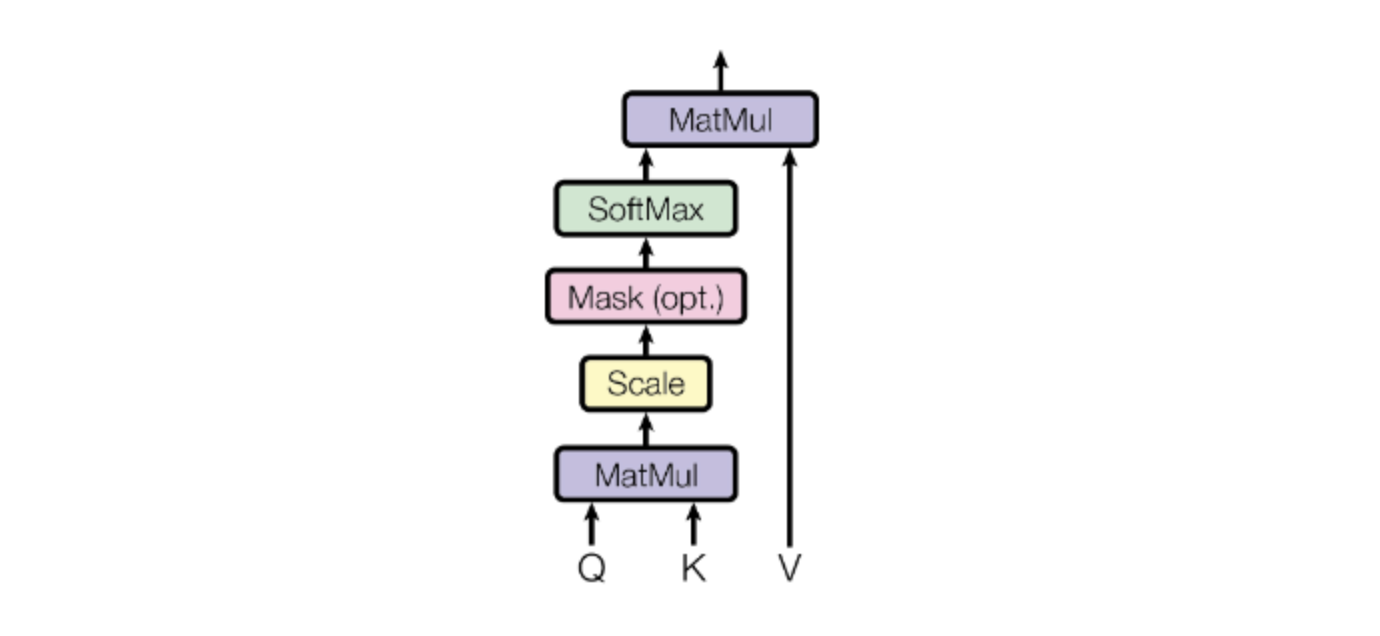
// llama.cppstaticstructggml_cgraph*llm_build_llama(/* ... */){// ...// K,Q,V are tensors initialized earlierstructggml_tensor*KQ=ggml_mul_mat(ctx0,K,Q);// KQ_scale is a single-number tensor initialized earlier.structggml_tensor*KQ_scaled=ggml_scale_inplace(ctx0,KQ,KQ_scale);structggml_tensor*KQ_masked=ggml_diag_mask_inf_inplace(ctx0,KQ_scaled,n_past);structggml_tensor*KQ_soft_max=ggml_soft_max_inplace(ctx0,KQ_masked);structggml_tensor*KQV=ggml_mul_mat(ctx0,V,KQ_soft_max);// ...}
The code is a series of tensor operations and builds a computation graph that is identical to the one described in the original Transformer paper:
In order to actually compute the result tensor (here it’s KQV) the following steps are taken:
Data is loaded into each leaf tensor’s data pointer. In the example the leaf tensors are K, Q and V.
The output tensor (KQV) is converted to a computation graph using ggml_build_forward(). This function is relatively straightforward and orders the nodes in a depth-first order.
The computation graph is run using ggml_graph_compute(), which runs ggml_compute_forward() on each node in a depth-first order. ggml_compute_forward() does the heavy lifting of calculations. It performs the mathetmatical operation and fills the tensor’s data pointer with the result.
At the end of this process, the output tensor’s data pointer points to the final result.
Offloading calculations to the GPU
Many tensor operations like matrix addition and multiplication can be calculated on a GPU much more efficiently due to its high parallelism. When a GPU is available, tensors can be marked with tensor->backend = GGML_BACKEND_GPU. In this case, ggml_compute_forward() will attempt to offload the calculation to the GPU. The GPU will perform the tensor operation, and the result will be stored on the GPU’s memory (and not in the data pointer).
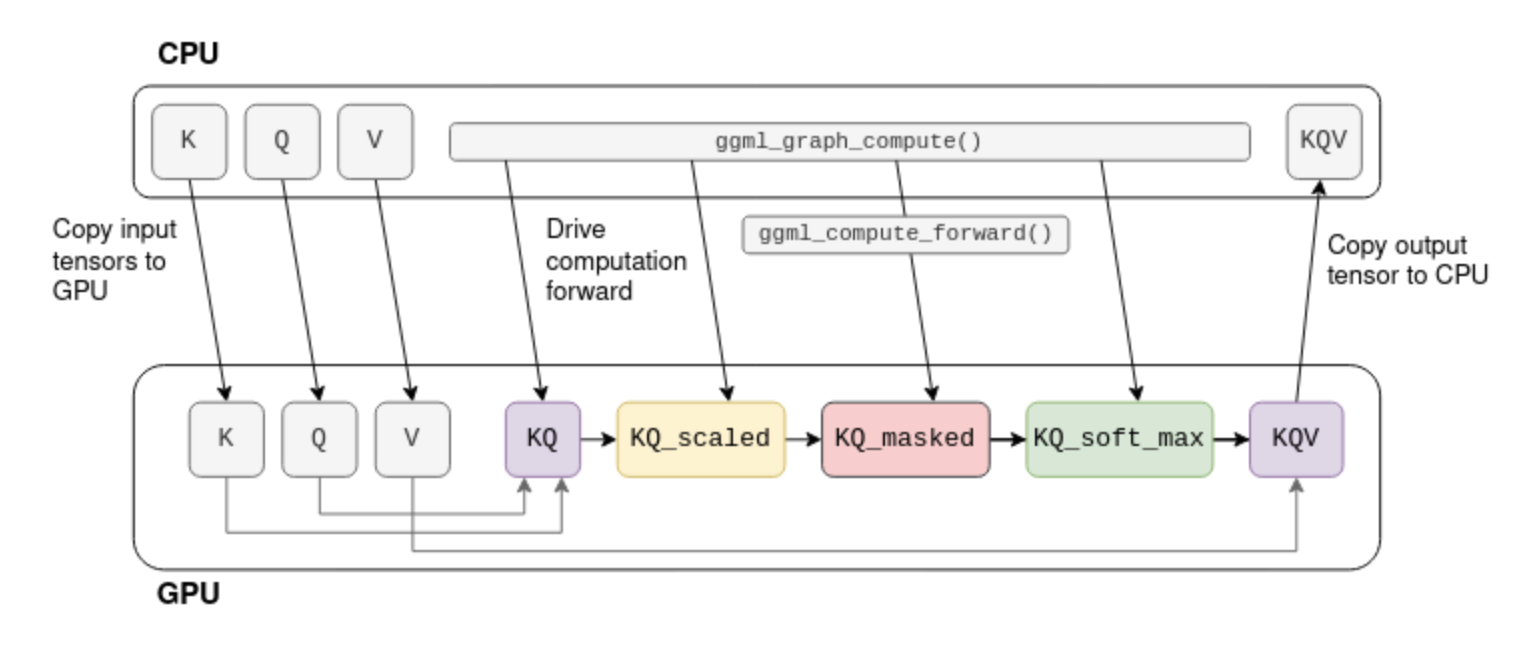
Consider the self-attention omputation graph shown before. Assuming that K,Q,V are fixed tensors, the computation can be offloaded to the GPU:
The process begins by copying K,Q,V to the GPU memory. The CPU then drives the computation forward tensor-by-tensor, but the actual mathematical operation is offloaded to the GPU. When the last operation in the graph ends, the result tensor’s data is copied back from the GPU memory to the CPU memory.
Note: In a real transformer K,Q,V are not fixed and KQV is not the final output. More on that later.
With this understanding of tensors, we can go back to the flow of LLaMA.
Tokenization
The first step in inference is tokenization. Tokenization is the process of splitting the prompt into a list of shorter strings known as tokens. The tokens must be part of the model’s vocabulary, which is the list of tokens the LLM was trained on. LLaMA’s vocabulary, for example, consists of 32k tokens and is distributed as part of the model.
For our example prompt, the tokenization splits the prompt into eleven tokens (spaces are replaced with the special meta symbol ’▁’ (U+2581)):
Quant
um
▁mechan
ics
▁is
▁a
▁fundamental
▁theory
▁in
▁physics
▁that
For tokenization, LLaMA uses the SentencePiece tokenizer with the byte-pair-encoding (BPE) algorithm. This tokenizer is interesting because it is subword-based, meaning that words may be represented by multiple tokens. In our prompt, for example, ‘Quantum’ is split into ‘Quant’ and ‘um’. During training, when the vocabulary is derived, the BPE algorithm ensures that common words are included in the vocabulary as a single token, while rare words are broken down into subwords. In the example above, the word ‘Quantum’ is not part of the vocabulary, but ‘Quant’ and ‘um’ are as two separate tokens. White spaces are not treated specially, and are included in the tokens themselves as the meta character if they are common enough.
Subword-based tokenization is powerful due to multiple reasons:
It allows the LLM to learn the meaning of rare words like ‘Quantum’ while keeping the vocabulary size relatively small by representing common suffixes and prefixes as separate tokens.
It learns language-specific features without employing language-specific tokenization schemes. Quoting from the BPE-encoding paper:
consider compounds such as the German Abwasser
behandlungs
anlange ‘sewage water treatment plant’, for which a segmented, variable-length representation is intuitively more appealing than encoding the word as a fixed-length vector.
Similarly, it is also useful in parsing code. For example, a variable named model_size will be tokenized into model|_|size, allowing the LLM to “understand” the purpose of the variable (yet another reason to give your variables indicative names!).
In llama.cpp, tokenization is performed using the llama_tokenize() function. This function takes the prompt string as input and returns a list of tokens, where each token is represented by an integer:
// llama.htypedefintllama_token;
// common.hstd::vector<llama_token>llama_tokenize(structllama_context*ctx,// the promptconststd::string&text,booladd_bos);
The tokenization process starts by breaking down the prompt into single-character tokens. Then, it iteratively tries to merge each two consequetive tokens into a larger one, as long as the merged token is part of the vocabulary. This ensures that the resulting tokens are as large as possible. For our example prompt, the tokenization steps are as follows:
Note that each intermediate step consists of valid tokenization according to the model’s vocabulary. However, only the last one is used as the input to the LLM.
Embeddings
The tokens are used as input to LLaMA to predict the next token. The key function here is the llm_build_llama() function:
This function takes a list of tokens represented by the tokens and n_tokens parameters as input. It then builds the full tensor computation graph of LLaMA, and returns it as a struct ggml_cgraph. No computation actually takes place at this stage. The n_past parameter, which is currently set to zero, can be ignored for now. We will revisit it later when discussing the kv cache.
Beside the tokens, the function makes use of the model weights, or model parameters. These are fixed tensors learned during the LLM training process and included as part of the model. These model parameters are pre-loaded into lctx before the inference begins.
We will now begin exploring the computation graph structure. The first part of this computation graph involves converting the tokens into embeddings.
An embedding is a fixed vector representation of each token that is more suitable for deep learning than pure integers, as it captures the semantic meaning of words. The size of this vector is the model dimension, which varies between models. In LLaMA-7B, for example, the model dimension is n_embd=4096.
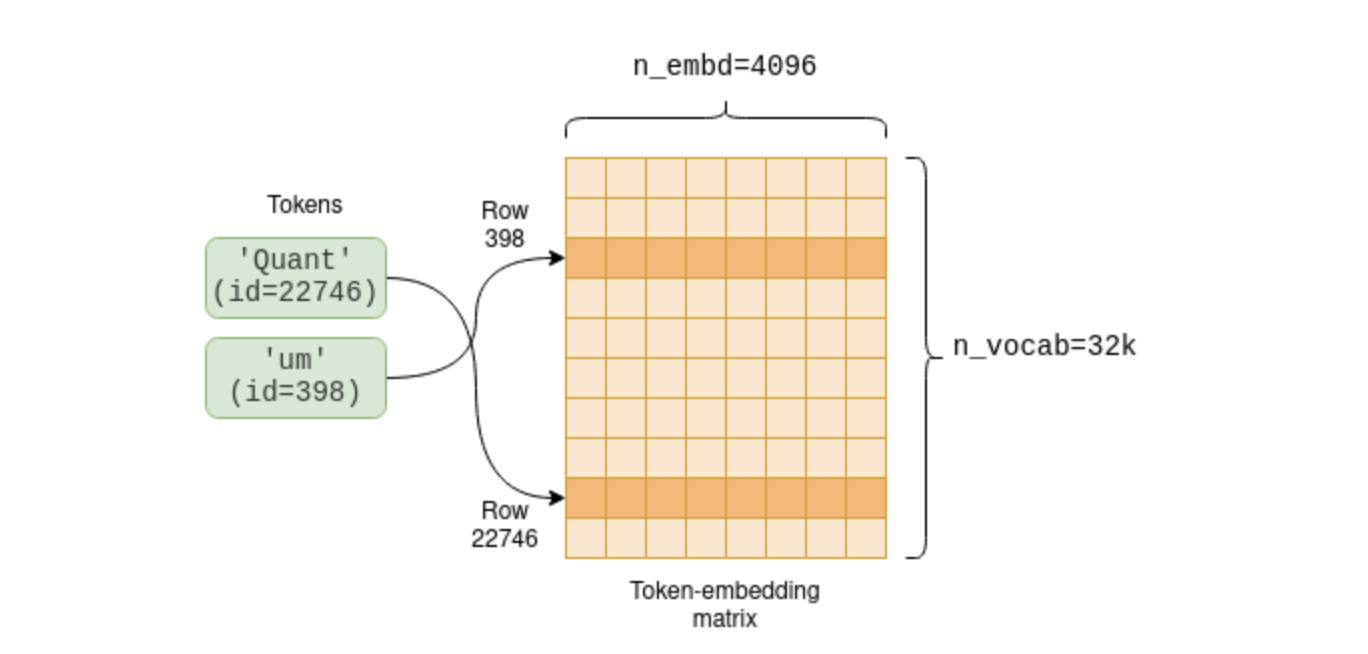
The model parameters include a token-embedding matrix that converts tokens into embeddings. Since our vocabulary size is n_vocab=32000, this is a 32000 x 4096 matrix with each row containing the embedding vector for one token:
Each token has an associated embedding which was learned during training and is accessible as part of the token-embedding matrix.
The first part of the computation graph extracts the relevant rows from the token-embedding matrix for each token:
The code first creates a new one-dimensional tensor of integers, called inp_tokens, to hold the numerical tokens. Then, it copies the token values into this tensor’s data pointer. Last, it creates a new GGML_OP_GET_ROWS tensor operation combining the token-embedding matrix model.tok_embeddings with our tokens.
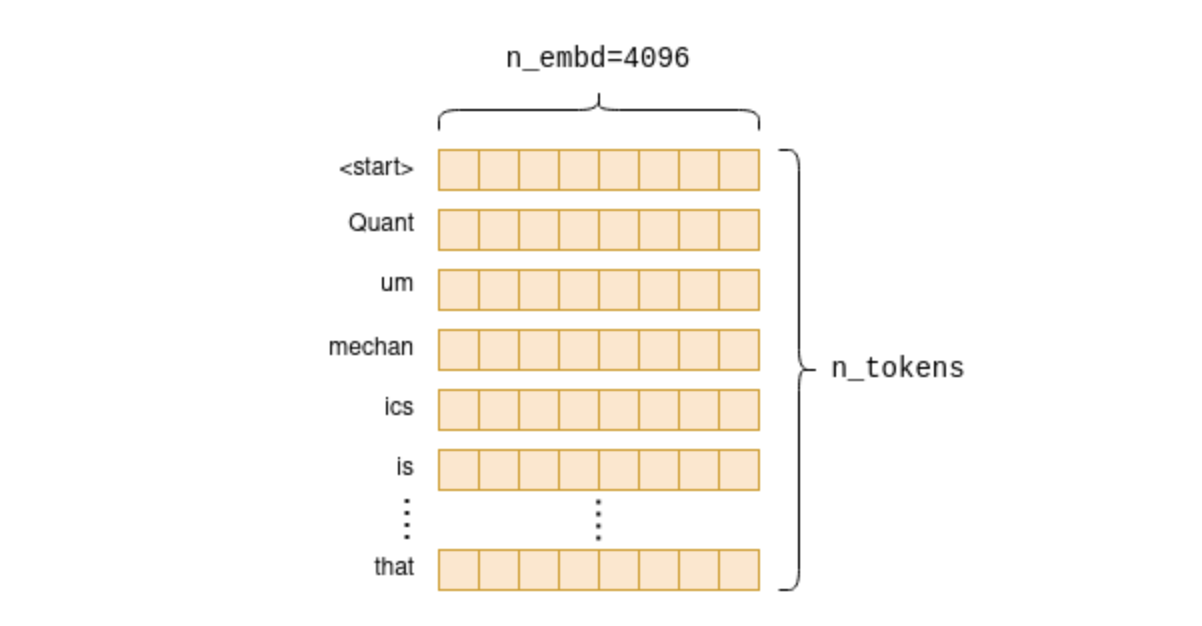
This operation, when later computed, pulls rows from the embeddings matrix as shown in the diagram above to create a new n_tokens x n_embd matrix containing only the embeddings for our tokens in their original order:
The embedding process creates a fixed-size embedding vector for each of the original tokens. When stacked together they make up the embedding matrix of the prompt.
The Transformer
The main part of the computation graph is called the Transformer. The Transformer is a neural network architecture that is the core of the LLM, and performs the main inference logic. In the following section we will explore some key aspects of the transformer from an engineering perspective, focusing on the self-attention mechanism. If you want to gain an understanding of the intuition behind the Transformer’s architecture instead, I recommend reading The Illustrated Transformer2.
Self-attention
We first zoom in to look at what self-attention is; after which we will zoom back out to see how it fits within the overall Transformer architecture3.
Self-attention is a mechanism that takes a sequence of tokens and produces a compact vector representation of that sequence, taking into account the relationships between the tokens. It is the only place within the LLM architecture where the relationships between the tokens are computed. Therefore, it forms the core of language comprehension, which entails understanding word relationships. Since it involves cross-token computations, it is also the most interesting place from an engineering perspective, as the computations can grow quite large, especially for longer sequences.
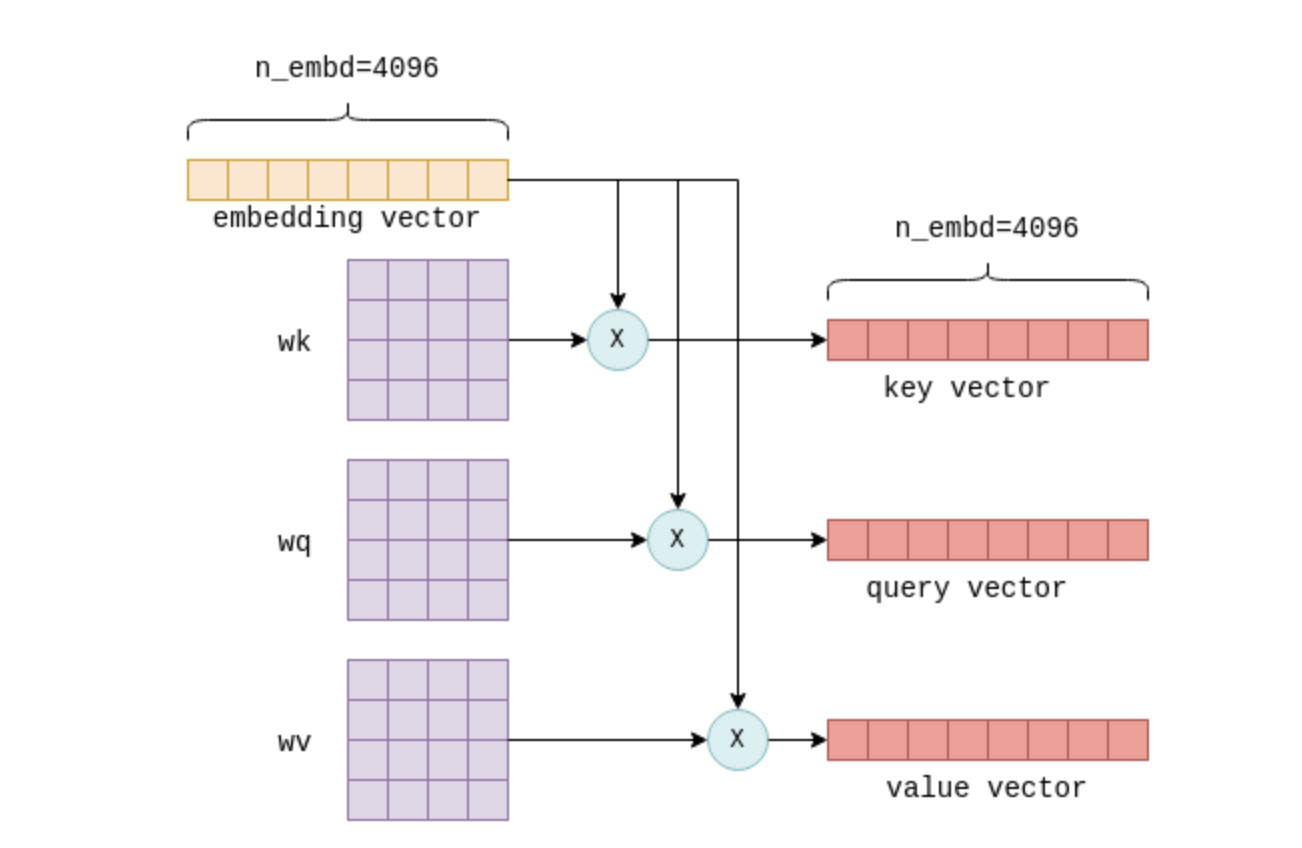
The input to the self-attention mechanism is the n_tokens x n_embd embedding matrix, with each row, or vector, representing an indivisual token4. Each of these vectors is then transformed into three distinct vectors, called “key”, “query” and “value” vectors. The transformation is achieved by multiplying the embedding vector of each token with the fixed wk, wq and wv matrices, which are part of the model parameters:
Multiplying the embedding vector of a token with the wk, wq and wv parameter matrices produces a “key”, “query” and “value” vector for that token.
This process is repeated for every token, i.e. n_tokens times. Theoretically, this could be done in a loop but for efficiency all rows are transformed in a single operation using matrix multiplication, which does exactly that. The relevant code looks as follows:
// llama.cpp (simplified to remove use of cache)// `cur` contains the input to the self-attention mechanismstructggml_tensor*K=ggml_mul_mat(ctx0,model.layers[il].wk,cur);structggml_tensor*Q=ggml_mul_mat(ctx0,model.layers[il].wq,cur);structggml_tensor*V=ggml_mul_mat(ctx0,model.layers[il].wv,cur);
We end up with K,Q and V: Three matrices, also of size n_tokens x n_embd, with the key, query and value vectors for each token stacked together.
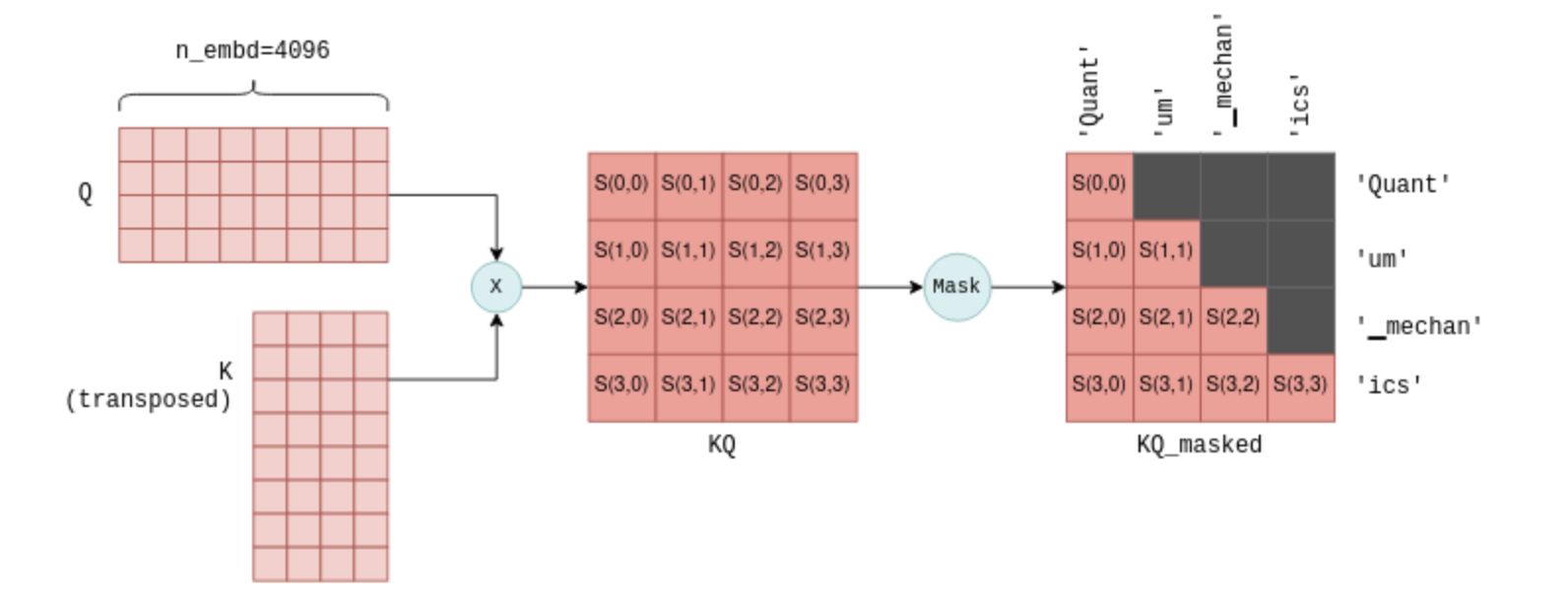
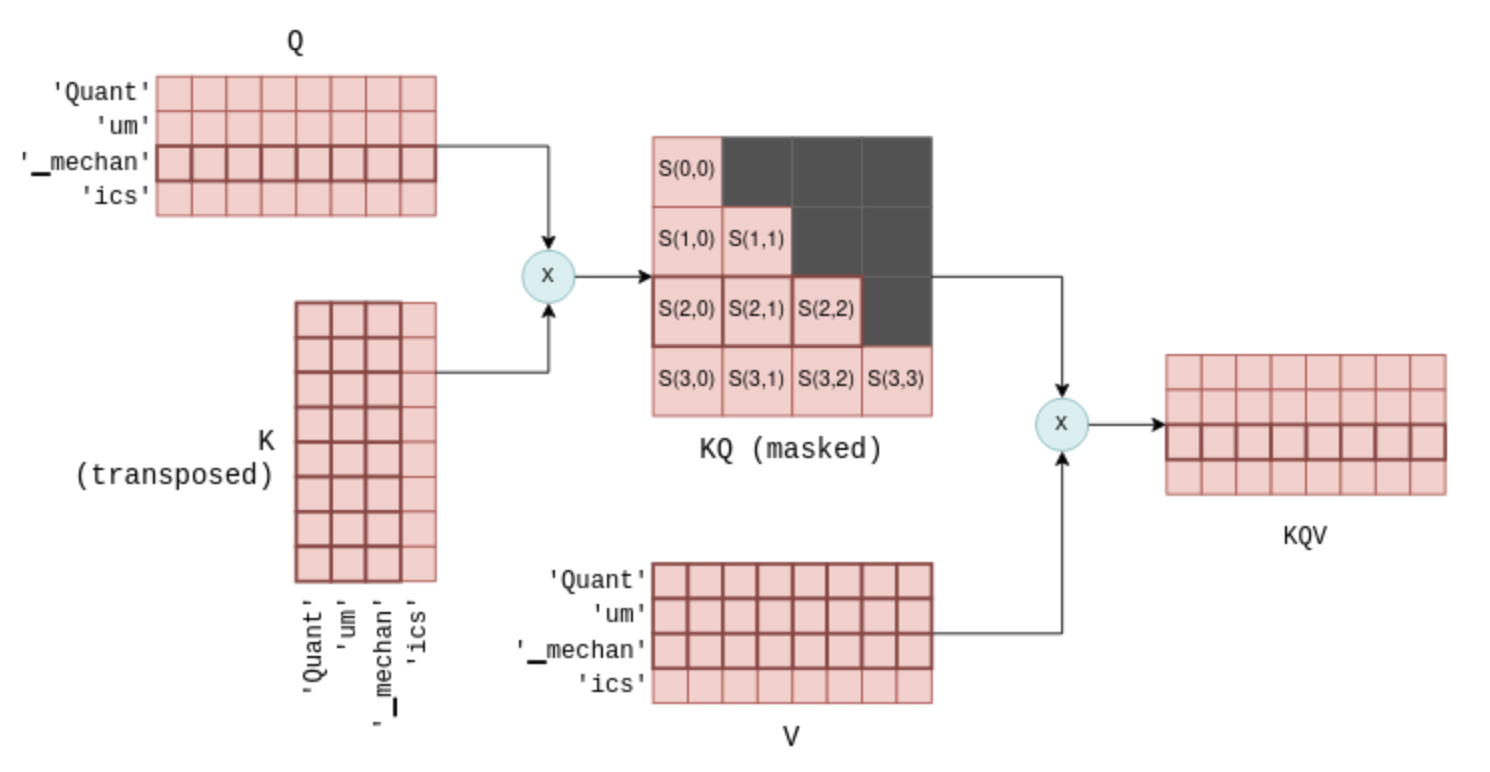
The next step of self-attention involves multiplying the matrix Q, which contains the stacked query vectors, with the transpose of the matrix K, which contains the stacked key vectors. For those less familiar with matrix operations, this operation essentially calculates a joint score for each pair of query and key vectors. We will use the notation S(i,j) to denote the score of query i with key j.
This process yield n_tokens^2 scores, one for each query-key pair, packed within a single matrix called KQ. This matrix is subsequently masked to remove the entries above the diagonal:
A joint score S(i,j) is calculated for each query-key pair by multiplying Q with the transpose of K. The result shown here is for the first four tokens, along with the tokens represented by each score. The masking step ensures that only scores between a token and its preceding tokens are kept. An intermediate scaling operation has been omitted for simplicity.
The masking operation is a critical step. For each token it retains scores only with its preceeding tokens. During the training phase, this constraint ensures that the LLM learns to predict tokens based solely on past tokens, rather than future ones. Moreover, as we’ll explore in more detail later, it allows for significant optimizations when predicting future tokens.
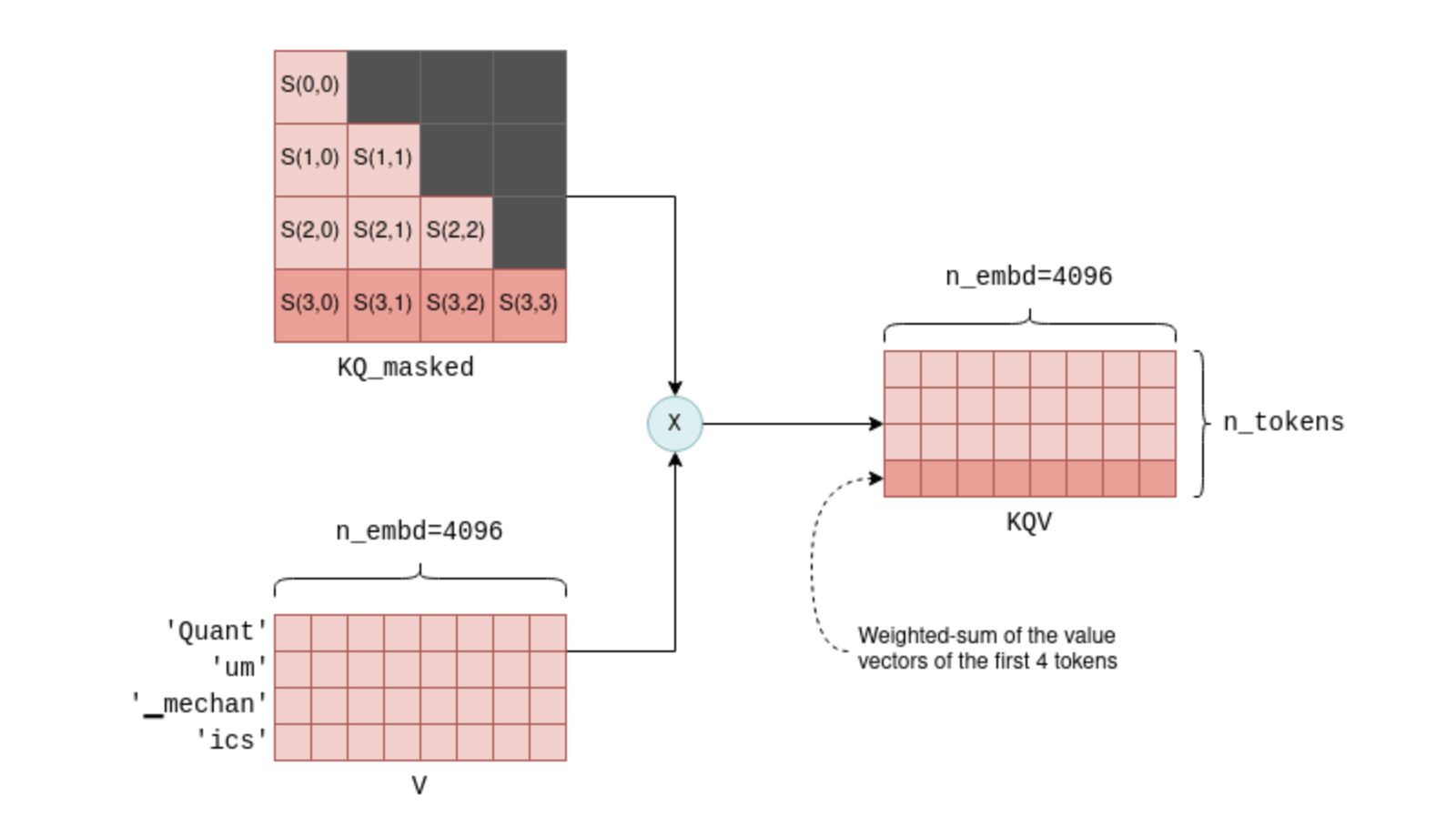
The last step of self-attention involves multiplying the masked scoring KQ_masked with the value vectors from before5. Such a matrix multiplication operation creates a weighted sum of the value vectors of all preceeding tokens, where the weights are the scores S(i,j). For example, for the fourth token ics it creates a weighted sum of the value vectors of Quant, um, ▁mechan and ics with the weights S(3,0) to S(3,3), which themselves were calculated from the query vector of ics and all preceeding key vectors.
The KQV matrix contains weighted sums of the value vectors. For example, the highlighted last row is a weighted sum of the first four value vectors, with the weights being the highlighted scores.
The KQV matrix concludes the self-attention mechanism. The relevant code implementing self-attention was already presented before in the context of general tensor computations, but now you are better equipped fully understand it.
The layers of the Transformer
Self-attention is one of the components in what are called the layers of the transformer. Each layer, in addition to the self-attention mechanism, contains multiple other tensor operations, mostly matrix addition, multiplication and activation that are part of a feed-forward neural network. We will not explore these more in detail, but just note the following facts:
Large, fixed, parameter matrices are used in the feed-forward network. In LLaMA-7B, their sizes are n_embd x n_ff = 4096 x 11008.
Besides self-attention, all other operations can be thought of as being carried row-by-row, or token-by-token. As mentioned before, only self-attention contains cross-token calculations. This will be important later when discussing the kv-cache.
The input and output are always of size n_tokens x n_embd: One row for each token, each the size of the model’s dimension.
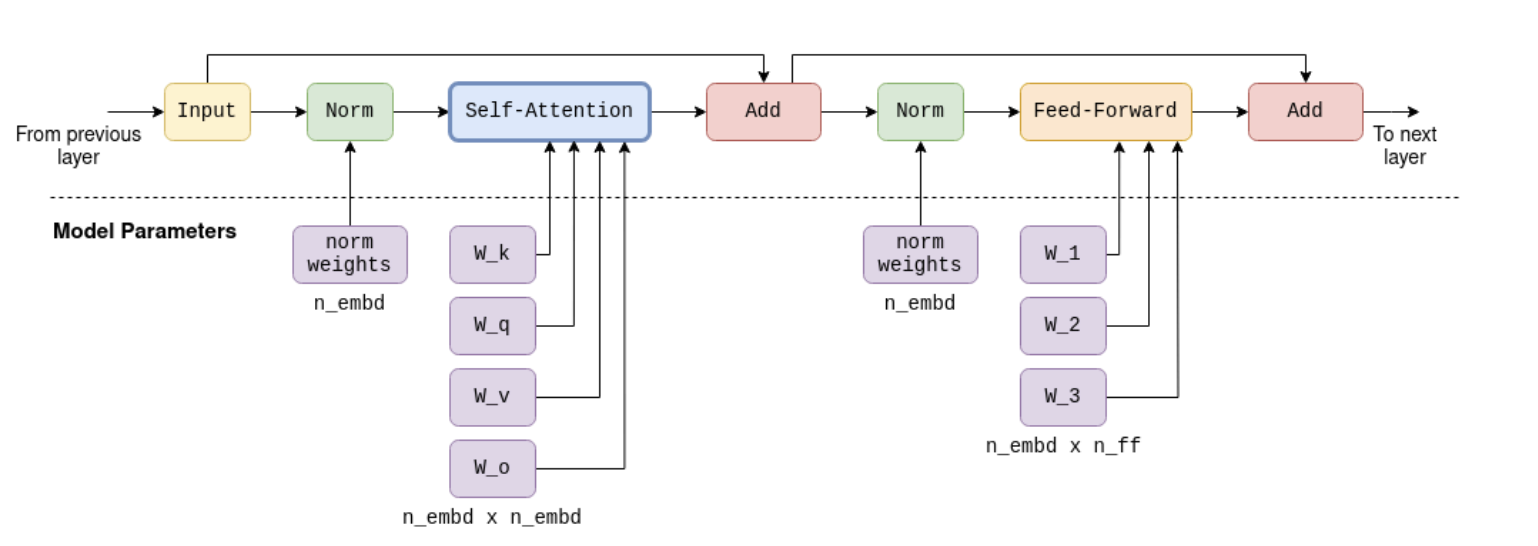
For completeness I included a diagram of a single Transformer layer in LLaMA-7B. Note that the exact architecture will most likely vary slightly in future models.
Full computation graph of a Transformer layer in LLaMA-7B, containing self-attention and feed-foward mechanisms. The output of each layer serves as the input to the next. Large parameter matrices are used both in the self-attention stage and in the feed-forward stage. These constitute most of the 7 billion parameters of the model.
In a Transformer architecture there are multiple layers. For example, in LLaMA-7B there are n_layers=32 layers. The layers are identical except that each has its own set of parameter matrices (e.g. its own wk, wq and wv matrices for the self-attention mechanism). The first layer’s input is the embedding matrix as described above. The first layer’s output is then used as the input to the second layer and so on. We can think of it as if each layer produces a list of embeddings, but each embedding no longer tied directly to a single token but rather to some kind of more complex understanding of token relationships.
Calculating the logits
The final step of the Transformer involves the computation of logits. A logit is a floating-point number that represents the probability that a particular token is the “correct” next token. The higher the value of the logit, the more likely it is that the corresponding token is the “correct” one.
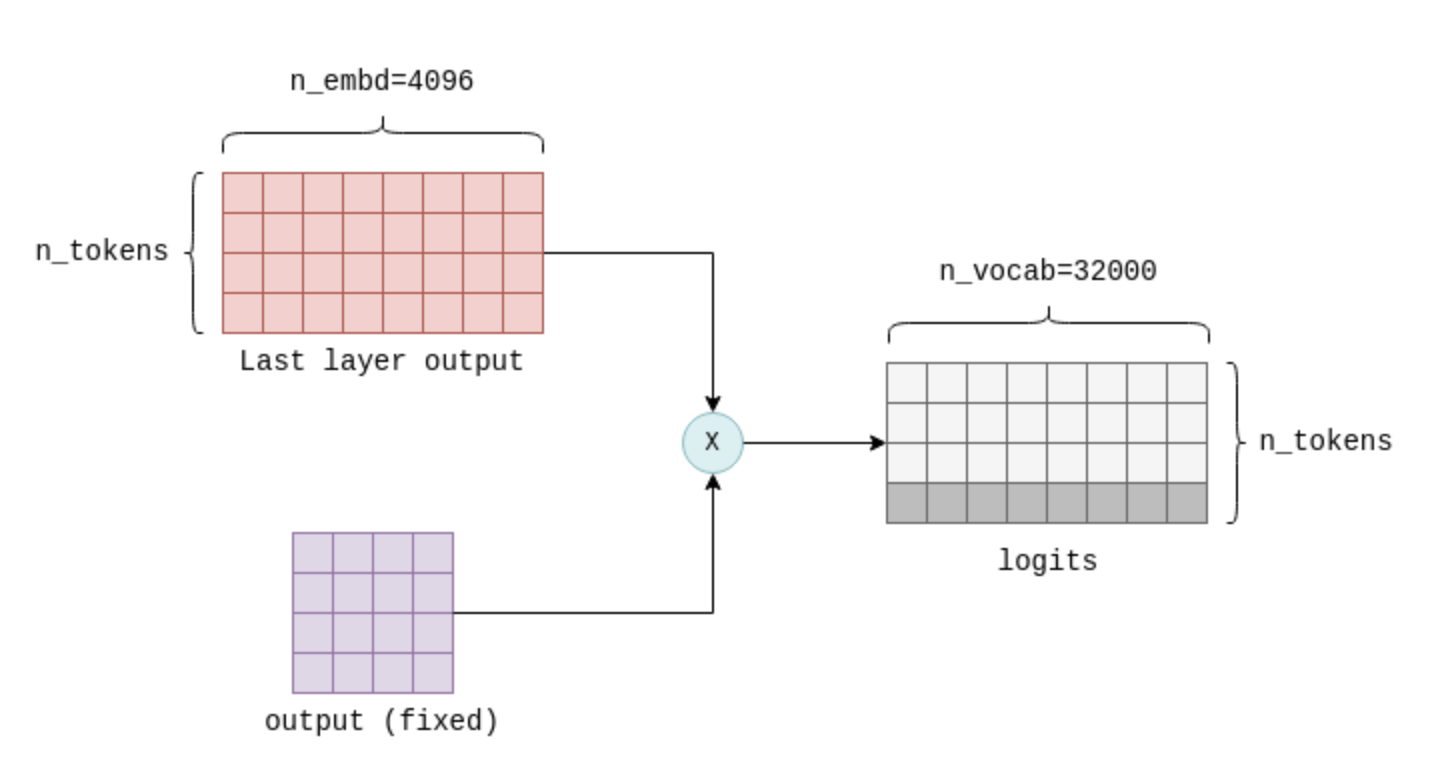
The logits are calculated by multiplying the output of the last Transformer layer with a fixed n_embd x n_vocab parameter matrix (also called output in llama.cpp). This operation results in a logit for each token in our vocabulary. For example, in LLaMA, it results in n_vocab=32000 logits:
The final step of the Transformer computes the logits by multiplying the output of the last layer with a fixed parameter matrix (also called ‘output’). Only the last row of the result, highlighted here, is of interest, and contains a logit for each possible next token in the vocabulary.
The logits are the Transformer’s output and tell us what the most likely next tokens are. By this all the tensor computations are concluded. The following simplified and commented version of the llm_build_llama() function summarizes all steps which were described in this section:
// llama.cpp (simplified and commented)staticstructggml_cgraph*llm_build_llama(llama_context&lctx,constllama_token*tokens,intn_tokens,intn_past){ggml_cgraph*gf=ggml_new_graph(ctx0);structggml_tensor*cur;structggml_tensor*inpL;// Create a tensor to hold the tokens.structggml_tensor*inp_tokens=ggml_new_tensor_1d(ctx0,GGML_TYPE_I32,N);// Copy the tokens into the tensormemcpy(inp_tokens->data,tokens,n_tokens*ggml_element_size(inp_tokens));// Create the embedding matrix.inpL=ggml_get_rows(ctx0,model.tok_embeddings,inp_tokens);// Iteratively apply all layers.for(intil=0;il<n_layer;++il){structggml_tensor*K=ggml_mul_mat(ctx0,model.layers[il].wk,cur);structggml_tensor*Q=ggml_mul_mat(ctx0,model.layers[il].wq,cur);structggml_tensor*V=ggml_mul_mat(ctx0,model.layers[il].wv,cur);structggml_tensor*KQ=ggml_mul_mat(ctx0,K,Q);structggml_tensor*KQ_scaled=ggml_scale_inplace(ctx0,KQ,KQ_scale);structggml_tensor*KQ_masked=ggml_diag_mask_inf_inplace(ctx0,KQ_scaled,n_past);structggml_tensor*KQ_soft_max=ggml_soft_max_inplace(ctx0,KQ_masked);structggml_tensor*KQV=ggml_mul_mat(ctx0,V,KQ_soft_max);// Run feed-forward network.// Produces `cur`.// ...// input for next layerinpL=cur;}cur=inpL;// Calculate logits from last layer's output.cur=ggml_mul_mat(ctx0,model.output,cur);// Build and return the computation graph.ggml_build_forward_expand(gf,cur);returngf;}
To actually performn inference, the computation graph returned by this function is computed, using ggml_graph_compute() as described previously. The logits are then copied out from the last tensor’s data pointer into an array of floats, ready for the next step called sampling.
Sampling
With the list of logits in hand, the next step is to choose the next token based on them. This process is called sampling. There are multiple sampling methods available, suitable for different use cases. In this section we will cover two basic sampling methods, with more advanced sampling methods like grammar sampling reserved for future posts.
Greedy sampling
Greedy sampling is a straightforward approach that selects the token with the highest logit associated with it.
For our example prompt, the following tokens have the highest logits:
token
logit
▁describes
18.990
▁provides
17.871
▁explains
17.403
▁de
16.361
▁gives
15.007
Therefore, greedy sampling will deterministically choose ▁describes as the next token. Greedy sampling is most useful when deterministic outputs are required when re-evaluating identical prompts.
Temperature sampling
Temperature sampling is probabilistic, meaning that the same prompt might produce different outputs when re-evaluated. It uses a parameter called temperature which is a floating-point value between 0 and 1 and affects the randomness of the result. The process goes as follows:
The logits are sorted from high to low and normalized using a softmax function to ensure that they all sum to 1. This transformation converts each logit into a probability.
A threshold (set to 0.95 by default) is applied, retaining only the top tokens such that their cumulative probability remains below the threshold. This step effectively removes low-probability tokens, preventing “bad” or “incorrect” tokens from being rarely sampled.
The remaining logits are divided by the temperature parameter and normalized again such that they all sum to 1 and represent probabilities.
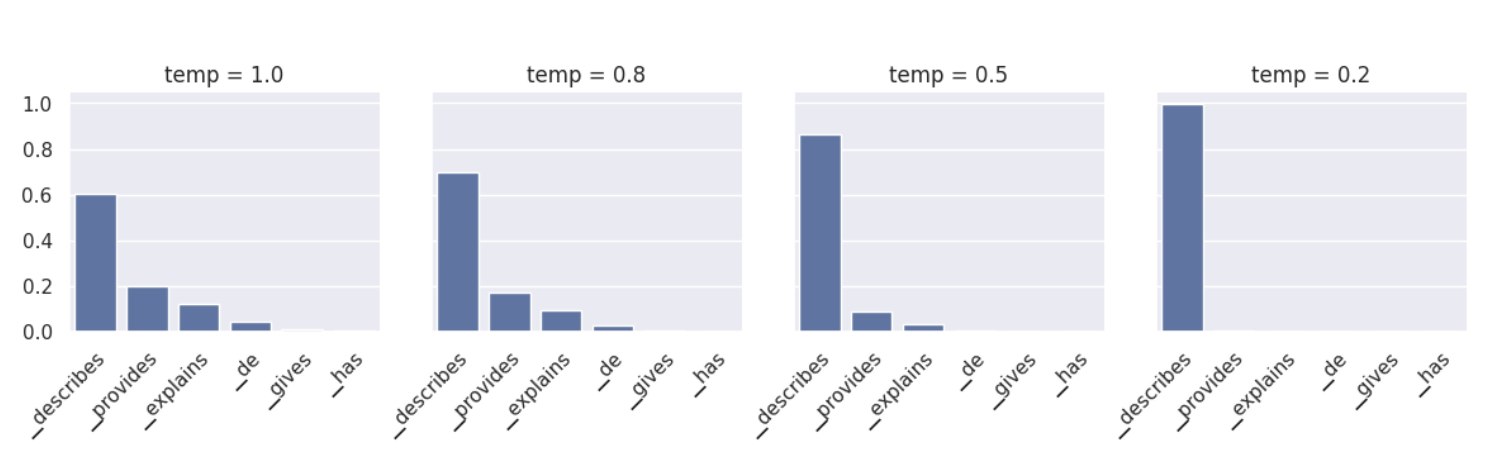
A token is randomly sampled based on these probabilities. For example, in our prompt, the token ▁describes has a probability of p=0.6, meaning that it will be chosen approximately 60% of the time. Upon re-evaluation, different tokens may be chosen.
The temperature parameter in step 3 serves to either increase or decrease randomness. Lower temperature values suppress lower probability tokens, making it more likely that the same tokens will be chosen on re-evaluation. Therefore, lower temperature values decrease randomness. In contrast, higher temperature values tend to “flatten” the probability distribution, emphasizing lower probability tokens. This increases the likelihood that each re-evaluation will result in different tokens, increasing randomness.
Normalized next-token probabilities for our example prompt. Lower temperatures suppress low-probability tokens, while higher temperatures emphasize them. temp=0 is essentially identical to greedy sampling.
Sampling a token concludes a full iteration of the LLM. After the initial token is sampled, it is added to the list of tokens, and the entire process runs again. The output iteratively becomes the input to the LLM, increasing by one token each iteration.
Theoretically, subsequent iterations can be carried out identically. However, to address performance degradation as the list of tokens grows, certain optimizations are employed. These will be covered next.
Optimizing inference
The self-attention stage of the Transformer can become a performance bottleneck as the list of input tokens to the LLM grows. A longer list of tokens means that larger matrices are multiplied together. Each matrix multiplication consists of many smaller numerical operations, known as floating-point operations, which are constrained by the GPU’s floating-point-operations-per-second capacity (flops). In the Transformer Inference Arithmetic, it is calculated that for a 52B parameter model, on an A100 GPU, performance starts to degrade at 208 tokens due to excessive flops. The most commonly employed optimization technique to solve this bottleneck is known as the kv cache.
The KV cache
To recap, each token has an associated embedding vector, which is further transformed into key and value vectors by multiplying it with the parameter matrices wk and wv. The kv cache is a cache for these key and value vectors. By caching them, we save the floating point operations required for re-calculating them on each iteration.
The cache works as follows:
During the initial iteration, the key and value vectors are computed for all tokens, as previously described, and then saved into the kv cache.
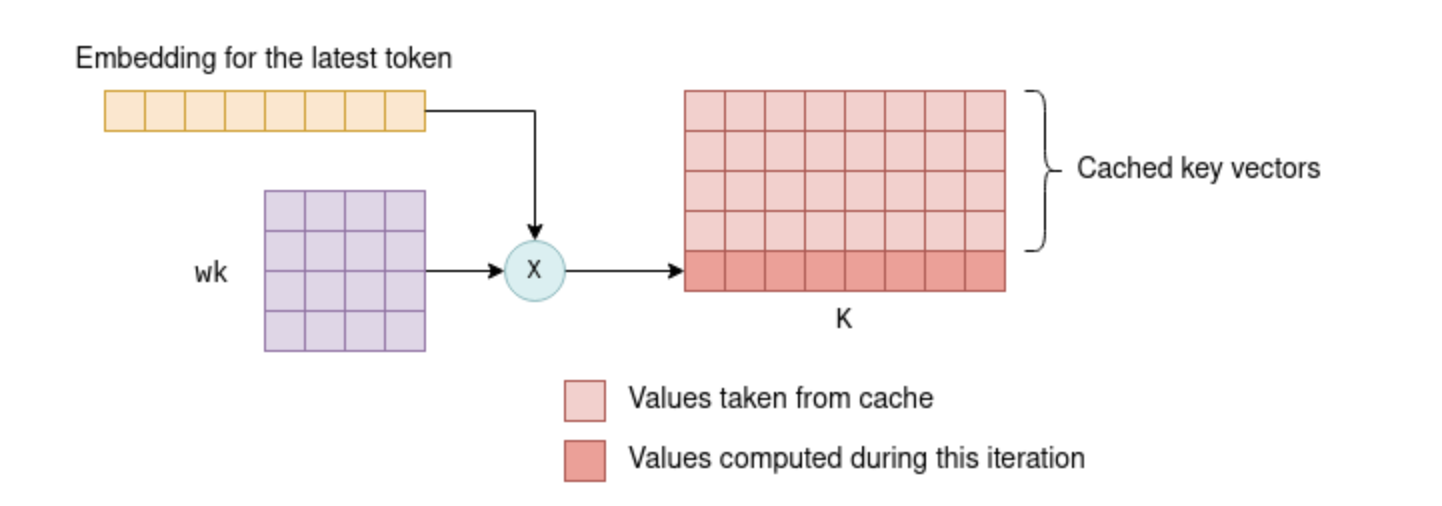
In subsequent iterations, only the key and value vectors for the newest token need to be calculated. The cached k-v vectors, together with the k-v vectors for the new token, are concatenated together to form the K and V matrices. This saves recalculating the k-v vectors for all previous tokens, which can be significant.
On subsequent iterations, the key vector of the latest token only is calculated. The rest are pulled from the cache, and together they form the K matrix. The newly-computed key vector is also saved to the cache. The same process is applied to the value vectors.
The ability to utilize a cache for key and value vectors arises from the fact that these vectors remain identical between iterations. For example, if we first process four tokens, and then five tokens, with the initial four unchanged, then the first four key and value vectors will remain identical between the first and the second iteration. As a result, there’s no need to recalculate key and value vectors for the first four tokens in the second iteration.
This principle holds true for all layers within the Transformer, not just the first one. In all layers, the key and value vectors for each token are solely dependent on previous tokens. Therefore, as new tokens are appended in subsequent iterations, the key and value vectors for existing tokens remain the same.
For the first layer, this concept is relatively straightforward to verify: the key vector of a token is determined by multiplying the token’s fixed embedding with the fixed wk parameter matrix. Thus, it remains unchanged in subsequent iterations, regardless of the additional tokens introduced. The same rationale applies to the value vector.
For the second layer and beyond, this principle is a bit less obvious but still holds true. To understand why, consider the first layer’s KQV matrix, the output of the self-attention stage. Each row in the KQV matrix is a weighted sum that depends on:
Value vectors of previous tokens.
Scores calculated from key vectors of previous tokens.
Therefore each row in KQV solely relies on previous tokens. This matrix, following a few additional row-based operations, serves as the input to the second layer. This implies that the second layer’s input will remain unchanged in future iterations, except for the addition of new rows. Inductively, the same logic extends to the rest of the layers.
Another look at how the KQV matrix is calculated. The third row, highlighted, is determined based only on the third query vector and the first three key and value vectors, also highlighted. Subsequent tokens do not affect it. Therefore it will stay fixed in future iterations.
Further optimizing subsequent iterations
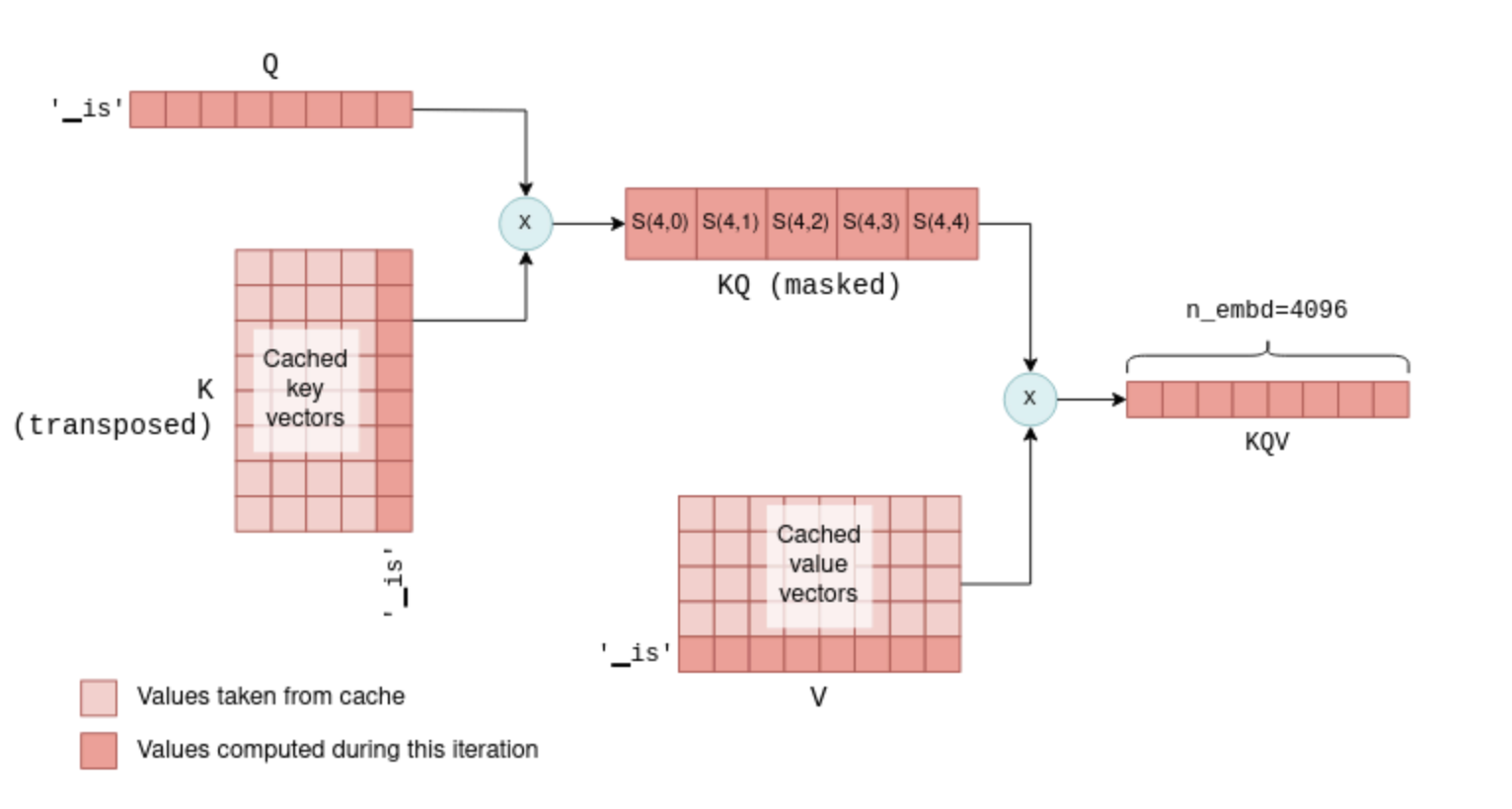
You might wonder why we don’t cache the query vectors as well, considering we cache the key and value vectors. The answer is that in fact, except for the query vector of the current token, query vectors for previous tokens are unnecessary in subsequent iterations. With the kv cache in place, we can actually feed the self-attention mechanism only with the latest token’s query vector. This query vector is multiplied with the cached K matrix to calculate the joint scores of the last token and all previous tokens. Then, it is multiplied with the cached V matrix to calculate only the latest row of the KQV matrix. In fact, across all layers, we now pass 1 x n_embd -sized vectors instead of the n_token x n_embd matrices calculated in the first iteration. To illustrate this, compare the following diagram, showing a later iteration, with the previous one:
Self-attention in subsequent iterations. In this example, there were four tokens in the first iteration and a fifth token, ‘▁is’, is added in the second iteration. The latest’s token key, query and value vectors, together with the cached key and value vectors, are used to compute the last row of KQV, which is all that is needed for predicting the next token.
This process repeats across all layers, utilizing each layer’s kv cache. As a result, the Transformer’s output in this case is a single vector of n_vocab logits predicting the next token.
With this optimization we save floating point operations of calculating unnecessary rows in KQ and KQV, which can become quite significant as the list of tokens grows in size.
The KV cache in practice
We can dive into llama.cpp code to see how the kv cache is implemented in practice. Unsurprisingly maybe, it is built using tensors, one for key vectors and one for value vectors:
// llama.cpp (simplified)structllama_kv_cache{// cache of key vectorsstructggml_tensor*k=NULL;// cache of value vectorsstructggml_tensor*v=NULL;intn;// number of tokens currently in the cache};
When the cache is initialized, enough space is allocated to hold 512 key and value vectors for each layer:
// llama.cpp (simplified)// n_ctx = 512 by defaultstaticboolllama_kv_cache_init(structllama_kv_cache&cache,ggml_typewtype,intn_ctx){// Allocate enough elements to hold n_ctx vectors for each layer.constint64_tn_elements=n_embd*n_layer*n_ctx;cache.k=ggml_new_tensor_1d(cache.ctx,wtype,n_elements);cache.v=ggml_new_tensor_1d(cache.ctx,wtype,n_elements);// ...}
Recall that during inference, the computation graph is built using the function llm_build_llama(). This function has a parameter called n_past that we ignored before. In the first iteration, the n_tokens parameter contains the number of tokens and n_past is set to 0. In subsequent iterations, n_tokens is set to 1 because only the latest token is processed, and n_past contains the number of past tokens. n_past is then used to pull the correct number of key and value vectors from the kv cache.
The relevant part from this function is shown here, utilizing the cache for calculating the K matrix. I simplified it slightly to ignore the multi-head attention and added comments for each step:
// llama.cpp (simplified and commented)staticstructggml_cgraph*llm_build_llama(llama_context&lctx,constllama_token*tokens,intn_tokens,intn_past){// ...// Iteratively apply all layers.for(intil=0;il<n_layer;++il){// Compute the key vector of the latest token.structggml_tensor*Kcur=ggml_mul_mat(ctx0,model.layers[il].wk,cur);// Build a view of size n_embd into an empty slot in the cache.structggml_tensor*k=ggml_view_1d(ctx0,kv_cache.k,// sizen_tokens*n_embd,// offset(ggml_element_size(kv_cache.k)*n_embd)*(il*n_ctx+n_past));// Copy latest token's k vector into the empty cache slot.ggml_cpy(ctx0,Kcur,k);// Form the K matrix by taking a view of the cache.structggml_tensor*K=ggml_view_2d(ctx0,kv_self.k,// row sizen_embd,// number of rowsn_past+n_tokens,// strideggml_element_size(kv_self.k)*n_embd,// cache offsetggml_element_size(kv_self.k)*n_embd*n_ctx*il);}}
First, the new key vector is calculated. Then, n_past is used to find the next empty slot in the cache, and the new key vector is copied there. Last, the matrix K is formed by taking a view into the cache with the correct number of tokens (n_past + n_tokens).
The kv cache is the basis for LLM inference optimization. It’s worth noting that the version implemented in llama.cpp (as of this writing) and presented here is not the most optimal one. For instance, it allocates a lot of memory in advance to hold the maximum number of key and value vectors supported (512 in this case). More advanced implementations, such as vLLM, aim to enhance memory usage efficiency and may offer further performance improvement. These advanced techniques are reserved for future posts. Moreover, as this field moves forward at lightning speeds, there are likely to be new and improved optimization techniques in the future.
Concluding
This post covered quite a lot of ground and should give you a basic understanding of the full process of LLM inference. With this knowledge you can get around more advanced resources:
LLM parameter counting and Transformer Inference Arithmetic analyze LLM performance in depth.
vLLM is a library for managing the kv cache memory more efficiently.
Continuous batching is an optimization technique to batch multiple LLM prompts together.
I also hope to cover the internals of more advanced topics in future posts. Some options include:
Quantized models.
Fine-tuned LLMs using LoRA.
Various attention mechanisms (Multi-head attention, Grouped-query attention and Sliding window attention).
LLM request batching.
Grammar sampling.
Stay tuned!
Footnotes
Footnotes
ggml also provides ggml_build_backward() that computes gradients in a backward manner from output to input. This is used for backpropagation only during model training, and never in inference. ↩
The article describes an encoder-decoder model. LLaMA is a decoder-only model, because it only predicts one token at a time. But the core concpets are the same. ↩
For simplicity I have chosen to describe here a single-head self-attention mechanism. LLaMA uses a multi-head self-attention mechanism. Except for making the tensor operations a bit more complicated, it has no implications for the core ideas presented in this section. ↩
To be precise, the embeddings first undergo a normalization operation that scales their values. We ignore it as it does not affect the core ideas presented. ↩
The scores also undergo a softmax operation, which scales them so that each row of scores sums of to 1. ↩
版本控制:Hugging Face Hub 使用类似 Git 的版本控制系统,可以追踪模型的迭代和更新。
Hugging Face 对机器学习社区产生了深远的影响。通过提供开源工具和平台,它极大地促进了AI模型的开放共享和协作。降低AI了门槛,使得非专业人士也能更容易地使用和部署复杂的AI模型,推动了AI的普及。标准化了模型接口和共享机制,加速研究与开发,让研究人员可以更快地构建和迭代新模型,开发者可以更快地将研究成果转化为实际应用。Hugging Face 聚集了全球大量的AI研究者和开发者,共同推动AI技术的发展。
总的来说,Hugging Face 已经成为机器学习领域不可或缺的一部分,无论你是研究人员、开发者还是仅仅对AI感兴趣,它都提供了丰富的资源和工具来帮助你探索和构建AI应用。作为一名安卓开发者,Hugging Face 也能帮助你更便捷地将强大的AI能力集成到你的移动应用中。
GPU 的优势:GPU 内部拥有成百上千甚至上万个小型计算核心(流处理器),它们天生就是为并行计算而设计的。CPU 只有少数几个强大的核心,擅长处理复杂且串行的任务;而 GPU 则能以“人海战术”的方式,同时处理数百万个简单计算。这使得 GPU 在执行矩阵乘法这类并行任务时,比 CPU 快上数十甚至数百倍。
在神经网络中,每一层神经元从前一层接收输入,然后通过与权重矩阵相乘来计算其输出。这个过程就是矩阵乘法。 矩阵乘法计算:一个 m X n 的 A 行列式,和一个 n X t 的 B 行列式可以进行乘法运算得到一个 C 行列式。拿 A 的第 i 行(n个元素)和 B 的第 j 列(n个元素)元素乘积之和,就是 C 的第 [i,j] 位的元素值。